

Making a pet memorial ornament with the Pet Memorial Generator
Difficulty: easy. Time: 10 minutes design, 15-30 minutes making. Best methods: engraved/cut wood or layered acrylic, multicolor 3D printing.
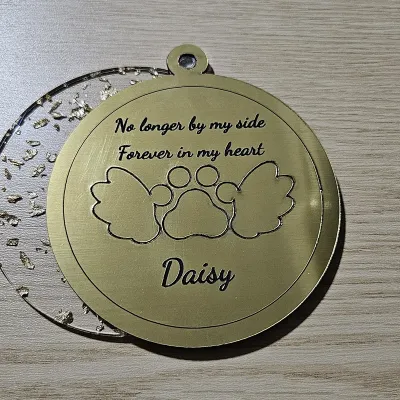
A little tribute for a companion who's no longer by your side. Type your pet's name in Pet Name and a line or two in Memorial Message (press Enter for each line), then center a paw flanked by Angel Wings. Pick a Wing Style - feathered, rounded, layered, or chubby - and dial in Wing Size and Wing Distance so the wings hug the paw just right. Choose Single Layer to engrave the words and cut the paw straight through one piece, or Two Layer to raise the paw, wings, and text on a backplate. Border Size sets the frame, and everything inside shrinks to stay within it.
What You'll Need
- Laser cutting: 3 mm laser-grade plywood for an engraved keepsake, or contrasting acrylic for a layered build
- Assembly: 3M 467 tape or CA glue for two-layer designs
- 3D printing: any FDM printer, with a color swap for the front layer
- Finishing: twine or ribbon for hanging
Step 1 - Name and message
Enter your pet's Pet Name and a short Memorial Message - a classic is "No longer by my side / Forever in my heart". Each line centers on its own, and you can give the name and the message their own fonts.
Step 2 - Paw and wings
- Toggle Add Angel Wings and pick a Wing Style that matches the mood - rounded and layered read softest.
- Use Wing Size to balance the wings against the paw, and Wing Distance to tuck them closer or spread them further out.
- Increase Border Size for a chunkier frame; the paw, wings, and text shrink automatically so nothing crosses the border.
Step 3 - Layers and export
Single Layer engraves the message and name (blue) and cuts the paw and wings clean through one piece. Two Layer raises everything on a backplate. Download the SVG for laser cutting, or set Extrusion Depth and export STL/3MF for printing.
Choose Your Build Method
Laser cutting
- Single-layer plywood is the go-to: the laser engraves the message and name and cuts the paw and wings through - blue paths engrave, red paths cut.
- For a two-layer keepsake, cut the backplate and the front (paw, wings, and text) from contrasting acrylic and bond with 3M tape.
- Keep the ornament around 80-100 mm so the message stays readable.
- Thread twine through the hanger hole to hang it on the tree or a memory shelf.
Make It Yours
- Add the years (e.g. 2010 - 2024) on the message lines for a dated keepsake.
- Make one for each pet and hang them together.
- Engrave a tiny heart or the message in a script font for a softer look.
- Gift it to a friend who recently lost a companion.
- Swap the paw for the wings only as a general angel/memorial ornament.
- Pair with the Paw Ornament for a matching set.
Keep up with MyLaserTools.
Email me about new tools, product updates, tutorials, and occasional MyLaserTools offers. Unsubscribe at any time.
© 2026 MyLaserTools.com. All rights reserved.