
Making a first house ornament with the First House Ornament Generator
Difficulty: easy. Time: 10 minutes design, 15-30 minutes making. Best methods: engraved/cut wood or layered acrylic, multicolor 3D printing.
A personalized ornament built around a house or key. Type a Name and a Message (press Enter for each new line), each with its own font, then pick a Symbol to sit above the text. Choose your Ornament Shape, set the Border, and pick Single Layer, Two Layer, or Three Layer - everything inside scales to stay within the shape.
What You'll Need
- Laser cutting: 3 mm laser-grade plywood for an engraved keepsake, or contrasting acrylic for a layered build
- Assembly: 3M 467 tape or CA glue for layered designs
- 3D printing: any FDM printer, with a color swap for the front layer
- Finishing: twine or ribbon for hanging
Step 1 - Shape and text
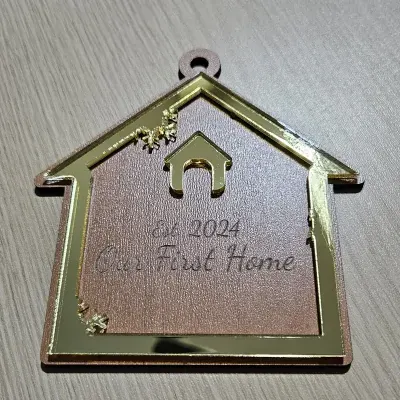
Pick the Ornament Shape (a house or key), then enter the Name (e.g. "Our First Home") and a Message (e.g. "Est. 2024"). Each line of the message is centered, and the name and message can use different fonts.
Step 2 - Symbol and frame
- Choose a Symbol - a house or key symbol - to sit above the text, or clear it to let the text fill the shape.
- Use Border Size to set the frame; the symbol and text shrink automatically so nothing crosses the edge.
- Nudge Text Size and Move X/Y to fine-tune the layout.
Step 3 - Layers and export
Single Layer engraves the text and cuts the shape from one piece. Two Layer raises the front (symbol + text) on a solid backplate; Three Layer adds a separate text layer. Download the SVG for laser cutting, or set Extrusion Depth and export STL/3MF for printing.
Choose Your Build Method
Laser cutting
- Single-layer plywood is the quickest: blue paths engrave the text and symbol, red paths cut the shape.
- For a layered keepsake, cut the backplate and the front from contrasting acrylic and bond with 3M tape.
- Keep the ornament around 80-100 mm so the message stays readable.
- Thread twine through the hanger hole to hang it.
Make It Yours
- Add the address or the year on a message line.
- Use the key shape for a fun "new keys" gift.
- Personalize with the family name.
- Pair it with a housewarming gift basket.
Keep up with MyLaserTools.
Email me about new tools, product updates, tutorials, and occasional MyLaserTools offers. Unsubscribe at any time.
© 2026 MyLaserTools.com. All rights reserved.