

Free QR Code Generator
Design custom QR code signs for laser engraving and 3D printing. Styled dot patterns, center logos, text labels. Export SVG, PNG, and STL for free.
Settings
QR Style
Base Plate
Label
Advanced
Vector Export
Raster Export
For UV printing, stickers, and other print uses.
3D Print
3D export supports Square and Dots module styles. Other styles fall back to simplified geometry.
Generate a design to see the 2D preview
Generate a design to see the export preview
How To Use
QR Code Sign Examples
See how the QR Code Sign Generator creates beautiful, functional QR code signs. These examples show a 3D-printed blue PLA plaque and a laser-engraved wooden plaque, both made from exported files.
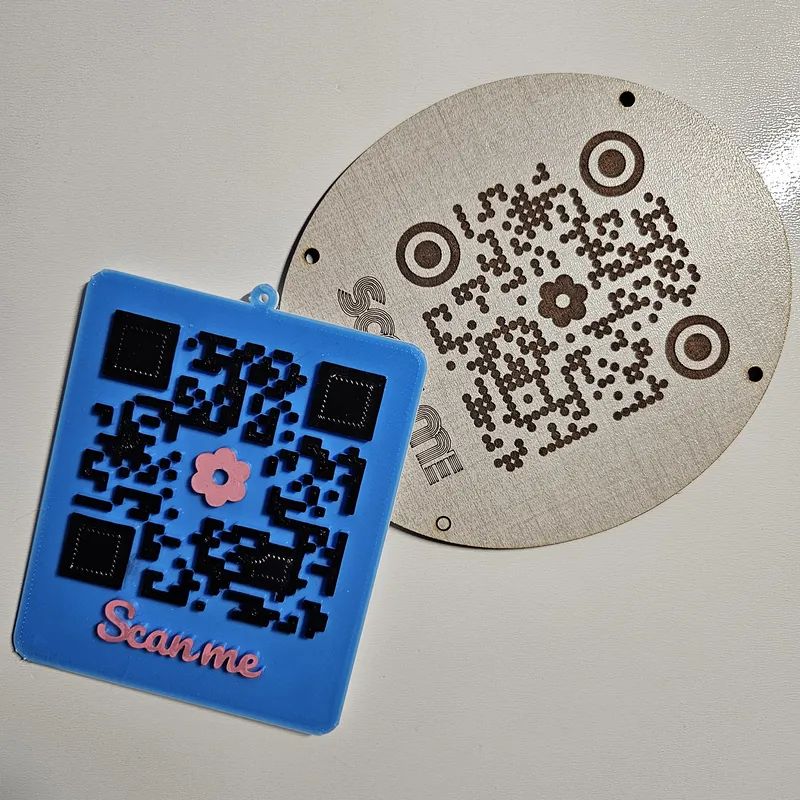
Materials used:
- Blue PLA filament (3D printed, STL export)
- TruFlat Linen plywood (laser engraved, SVG export)
Square module style on the 3D-printed version, dot pattern on the engraved version. Both use a flower center logo and connected text label.
Frequently Asked Questions
Yes. The QR Code Sign Generator is 100% free with no limits, no watermarks, and no trial period. Generate and download as many files as you want, free forever.
Design custom QR code signs for laser engraving and 3D printing. Styled dot patterns, center logos, text labels. Export SVG, PNG, STL, and 3MF.. Adjust the settings, preview your design in real time, and download a ready-to-make file in seconds.
It exports clean SVG files for laser cutting, CNC, and vinyl, plus STL and multi-colour 3MF files for 3D printing. Everything is generated instantly in your browser.
Laser cutters and engravers including Glowforge, xTool, LightBurn, OMTech, Epilog, Trotec, Thunder Laser, and any machine that accepts SVG or vector files. CNC routers and mills via SVG import in tools like Vectric, Carbide Create, Easel, and Fusion 360. 3D printers via slicers such as Bambu Studio, PrusaSlicer, OrcaSlicer, and Cura, with 3MF files carrying colour data for multi-colour prints. Any home or office printer for print-and-make projects.
You can use wood, acrylic, leather, MDF, plywood, cardboard, and paper for laser cutting and CNC, and PLA, PETG, ABS, TPU, and any filament your printer supports for 3D printing. The generated files are standard formats compatible with any material your machine can handle.
No account or sign-up is required for the QR Code Sign Generator. It runs entirely in your browser, your designs never leave your device, and there is nothing to install.
Yes. A commercial license is included, so you can sell products made with the QR Code Sign Generator on Etsy, Amazon Handmade, Shopify, at craft fairs, or anywhere else. Attribution is appreciated but not required.
Visit the MyLaserTools Learning Center for a step-by-step QR Code Sign Generator guide, plus material tips and file-format help for laser cutting, CNC, and 3D printing. The guides walk you through every setting and how to prepare your files for your machine.
Open the QR Code Sign Generator guideAbout
This free QR code generator for laser cutting, engraving, and 3D printing lets you design custom QR code signs with styled dot patterns, rounded corners, center logos, and connected text labels. Export engraving-ready SVG files compatible with all laser cutters and engravers including LightBurn, Glowforge, xTool Creative Space, Epilog Laser, Trotec Laser, and Cricut, plus STL files for FDM 3D printers like Bambu Lab, Prusa, and Creality. Choose from four module styles (square, dots, rounded, extra rounded), three corner styles, and four plaque shapes. Add a hanger hole or mounting holes for easy display. 3D print export supports Square and Dots module styles.
Supports URL, plain text, WiFi credentials, email, phone, SMS, and GPS location QR codes. Perfect for laser-engraved Airbnb check-in signs, restaurant menu QR plaques, WiFi password signs, business card displays, 3D-printed room tags, and retail product tags. Works with laser-grade plywood, acrylic sheets, MDF, bamboo, leather, and PLA/PETG filament. Download your free QR code SVG, PNG, STL, or STL and start making today.
QR Code is a registered trademark of DENSO WAVE INCORPORATED.
Keep up with MyLaserTools.
Email me about new tools, product updates, tutorials, and occasional MyLaserTools offers. Unsubscribe at any time.
© 2026 MyLaserTools.com. All rights reserved.