

Lunar Calendar Generator
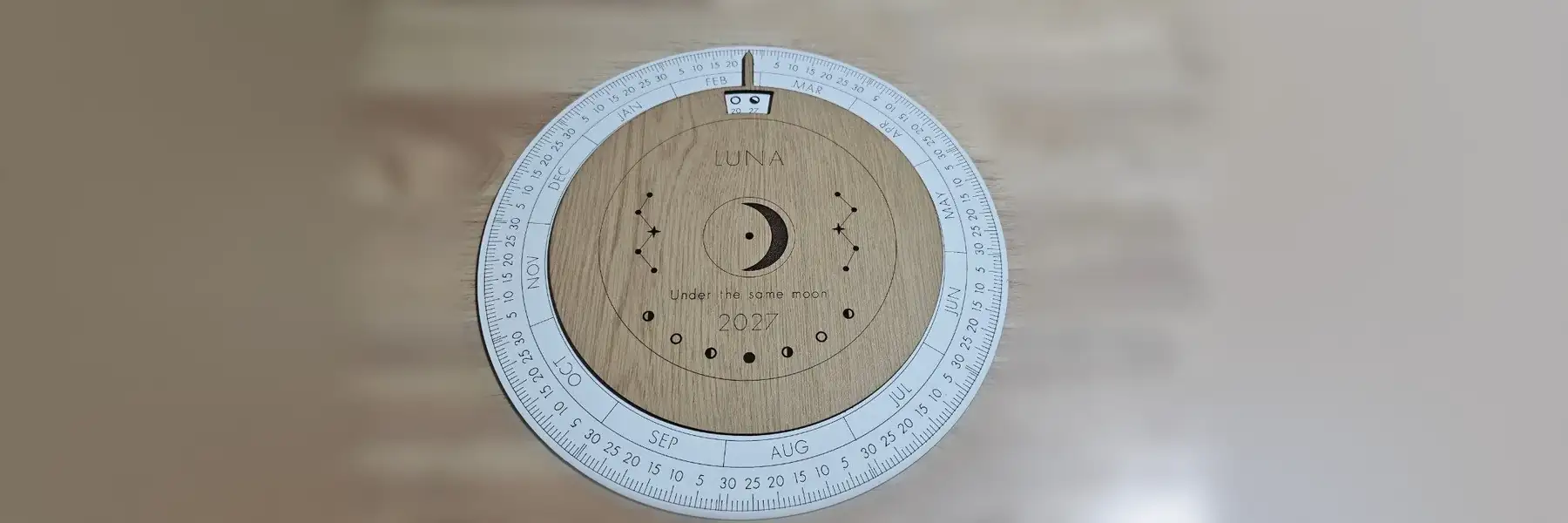
A wooden moon phase wheel for one year. Every new moon, quarter and full moon sits on its real date for your time zone, and a turning top disc points at today.
Settings
Build
Calendar
49 moon phases in 2027.
Top disc
Loading the font. Download is available once the numbers and month names are ready.
Preview and export
Vector Export
Prints the moon icons, numbers and text instead of engraving them. The PNG is 300 dpi and the same size as the SVG sheet, so it lines up with the cut lines.
Generate a design to see the 2D preview
Generate a design to see the export preview
Examples
A 2027 window disc calendar in the Celestial style.
The oak top disc turns on a split pin, and its window shows the moon phases around the chosen day.
Material used:
How To Use
Frequently Asked Questions
Yes. The Lunar Calendar Generator is 100% free with no limits, no watermarks, and no trial period. Generate and download as many files as you want, free forever.
Free laser cut moon phase wheel for any year, with each phase on its local date and a turning top disc. Adjust the settings, preview your design in real time, and download a ready-to-make file in seconds.
It exports clean, machine-ready SVG vector files with separate cut and engrave layers where applicable. Files are generated instantly in your browser.
Laser cutters and engravers including Glowforge, xTool, LightBurn, OMTech, Epilog, Trotec, Thunder Laser, and any machine that accepts SVG or vector files. CNC routers and mills via SVG import in tools like Vectric, Carbide Create, Easel, and Fusion 360.
You can use wood, acrylic, leather, MDF, plywood, cardboard, and paper for laser cutting and CNC. The generated files are standard formats compatible with any material your machine can handle.
No account or sign-up is required for the Lunar Calendar Generator. It runs entirely in your browser, your designs never leave your device, and there is nothing to install.
Yes. A commercial license is included, so you can sell products made with the Lunar Calendar Generator on Etsy, Amazon Handmade, Shopify, at craft fairs, or anywhere else. Attribution is appreciated but not required.
Visit the MyLaserTools Learning Center for a step-by-step Lunar Calendar Generator guide, plus material tips and file-format help for laser cutting, CNC, and 3D printing. The guides walk you through every setting and how to prepare your files for your machine.
Open the Lunar Calendar Generator guideAbout
This lunar calendar generator draws a moon phase wheel for any year from 2000 to 2100. The base disc has a tick for every day, the months, and an icon for each new moon, first quarter, full moon and last quarter. A top disc on a split pin turns to the date.
Phase times come from the formulas in Jean Meeus's Astronomical Algorithms and land within a minute or two of published tables. Each one is then moved into your time zone before it goes on the wheel, which is why the same year can look slightly different for Sydney and London.
Month names are engraved as short capitals in your language, and phase dates as plain numbers, because the single line fonts cover those best. Your title and message can use any letter the font has.
Keep up with MyLaserTools.
Email me about new tools, product updates, tutorials, and occasional MyLaserTools offers. Unsubscribe at any time.
© 2026 MyLaserTools.com. All rights reserved.