

Free Family Tree of Life Generator
Design a personalized family tree of life, free. Add each name, pick a tree style, choose heart, circle, apple, dove, or bird tags, and add a ribbon banner. Download a print-ready PNG, a layered SVG for laser cutting and engraving, or an STL/3MF for 3D printing.
Examples
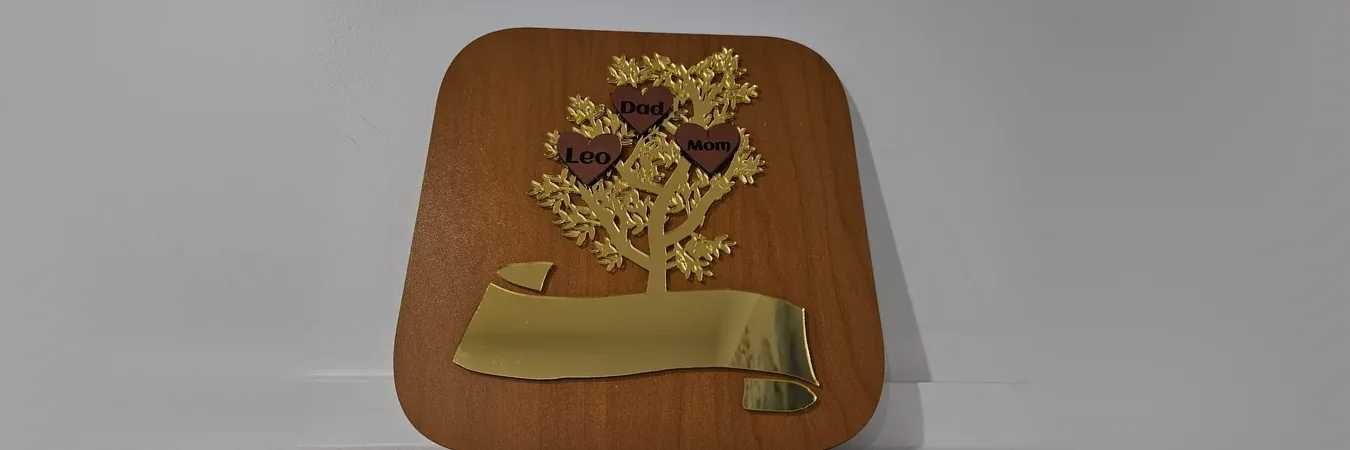
Design a personalized family tree wall sign, then cut or engrave it from wood, acrylic, or a layered mix. Preview it in the browser and download an SVG for your laser or an STL/3MF for 3D printing.
Materials used:
- TruFlat® Cherry Plywood (board)
- Gold Mirror Acrylic (tree & banner)
- Brushed Copper Acrylic (engraves black) (name tags)
Material Suggestions
For a stacked wooden sign, cut the tags and banner from a light wood and the tree from a darker wood, then glue the tags over the branches. For a flush look, switch to Inlay mode and drop the light-wood tags, banner, and names into the tree cutouts. For a single piece, set the Tree layer to Engrave and burn the names into one hardwood or slate blank. Mirror or coloured acrylic also works well when you want a bold, contemporary finish.
How To Use
Add each family member's name. Tags fan out across the canopy automatically, and Shuffle layout reshuffles where they sit.
Pick a tree style and a tag shape (heart, circle, apple, dove, or bird), then set the look with an Inspirational Palette.
Choose Stacked or Inlay: Stacked glues the tags and banner on top of the tree, Inlay drops them flush into holes cut in it.
Pick a ribbon banner and a backing board shape, type your family name, and choose fonts for the names and the banner.
Download a print PNG or SVG, a layered laser SVG (cut and engrave groups), or an STL/3MF for 3D printing.
Pro Tip: For a flush single-panel sign, switch to Inlay mode and cut the tags, banner, and names from a lighter wood so they drop into the tree cutouts. Prefer a raised look? Use Stacked mode and glue the layers, or send the STL/3MF to a 3D printer instead.
About
This free family tree of life generator turns a list of names into a personalized wall sign. Pick from several tree styles, give each name its own tag, a heart, circle, apple, dove, or bird, and the canopy fans the tags out so the tree always looks balanced, whether you have two names or twelve. Add a scrolled ribbon banner with your family name and pick fonts to match the occasion.
Style it with an Inspirational Palette, from wood tones to pastels, ocean, and mono, and download a high-resolution PNG for printing and framing, a layered laser SVG, or an STL/3MF for 3D printing. Choose Stacked mode, where the tree engraves while the tags and banner cut and LightBurn and xTool assign operations by colour, or Inlay mode, where the tags, banner, and names drop flush into the tree. It is perfect for a layered wooden family tree, an anniversary or wedding keepsake, or a reunion gift. Preview it as layered wood before you cut, or open it straight in the Design Editor.
Frequently Asked Questions
Yes. Design and download your family tree for free, with no watermark and no sign-up. Everything is drawn in your browser and nothing is uploaded.
From one up to twelve. Add or remove names and the tree regrows a branch to reach each one, fanning the tags across the canopy so it stays balanced whether you have a couple or a large family.
Yes. Pick from several tree styles, from a full Leafy Tree or Pine to a Branchy Tree, Sapling, Bonsai, and more, then choose a ribbon banner style and a rounded, rectangle, or oval backing board. Restyle the whole sign at once with an Inspirational Palette.
Heart, circle, apple, dove, or bird. Each name sits in its own tag, fanned across the canopy, and you can restyle the whole sign with the Inspirational Palette.
In Stacked mode the tags and banner sit on top of the tree and the names engrave, ideal for a raised two-tone wood sign. In Inlay mode the tree carries cutouts and the tags, banner, and names drop in flush, ideal for a single-panel sign or a 3D print.
A high-resolution PNG and a print SVG for framing, a layered SVG for laser cutting and CNC where the board, tree, tags, and names each export as their own cut or engrave group for LightBurn and xTool, plus STL and 3MF for 3D printing.
Yes. Use Stacked mode to cut the tags and banner from a lighter wood and the tree from a darker one and glue them, or set the tree layer to Engrave for a single-board keepsake. Use the layered-wood 3D preview to check the look before you cut.
Visit the MyLaserTools Learning Center for a step-by-step Family Tree of Life Generator guide, plus material tips and file-format help for laser cutting, CNC, and 3D printing. The guides walk you through every setting and how to prepare your files for your machine.
Open the Family Tree of Life Generator guideKeep up with MyLaserTools.
Email me about new tools, product updates, tutorials, and occasional MyLaserTools offers. Unsubscribe at any time.
© 2026 MyLaserTools.com. All rights reserved.