

Print Map Generator
Turn any place into a print-ready map poster, postcard, or bookmark. Pick a layout, shape, and colours, add a title and coordinates, then download a single-layer PNG or SVG sized for standard paper.
How To Use
Examples
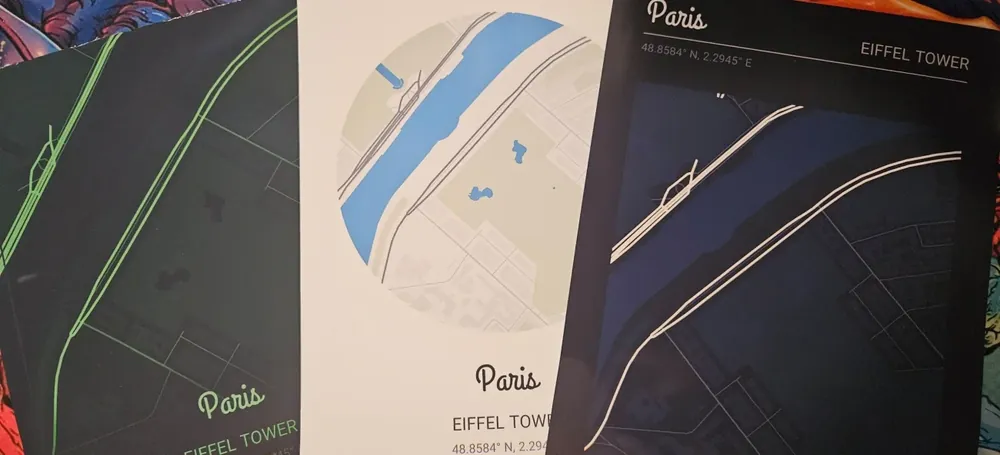
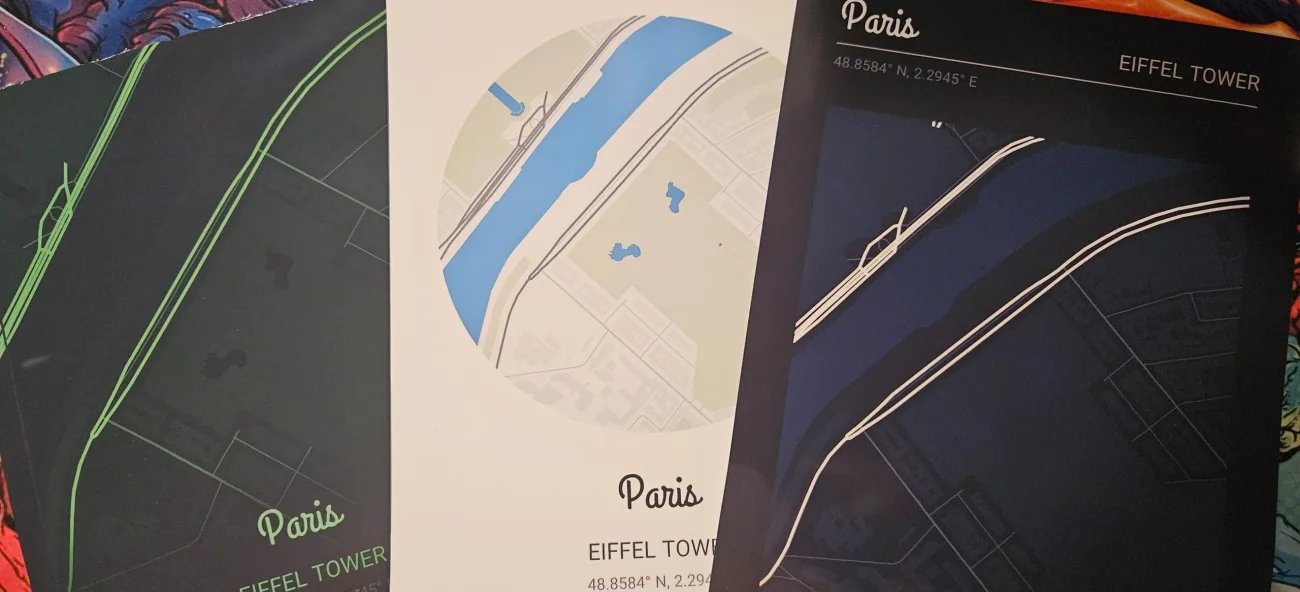
Custom map posters designed for a favourite city, hometown, or a place that marks a special moment, printed and framed for the wall.
Great for:
- Wedding, anniversary, and first-date location keepsakes
- Hometown and travel-memory wall art
- Postcards and bookmarks as small gifts
- Housewarming and moving-day prints
About
This free map poster generator turns any city, town, or place into print-ready wall art. Search for a location, choose a layout (poster, postcard, or bookmark), pick a shape and colour palette, then add a custom title and GPS coordinates. Export a single-layer PNG for instant printing or a clean SVG sized for standard paper, so your design drops straight into A4, A3, Letter, and other common paper sizes without resizing or trimming.
Perfect for personalised wedding and anniversary gifts, hometown and travel-memory prints, housewarming presents, and minimalist street-map decor. Choose from curated palettes or set your own paper, land, water, road, and text colours, add a border or a location marker, and fine-tune the map scale to frame exactly the streets you want. Design your custom map poster online and download a free high-resolution PNG or SVG to print at home or at any print shop.
Frequently Asked Questions
Yes. Create and download map posters, postcards, and bookmarks for free, with no watermark. Search any place, style it, and download a print-ready PNG or SVG. A free account is used to generate the map export.
Personalized map posters, postcards, and bookmarks of any city, town, or place, clipped to a circle, heart, house, or any other shape. Add a title, place name, coordinates, and date. Great for anniversary, wedding, new-home, and 'where we met' gifts.
It exports a high-resolution single-layer PNG (up to 4096px, which is 300 dpi through about A4 and a comfortable 200+ dpi at A3) and a single-layer SVG that scales to any size without losing quality. Choose a poster (A3, A4, A5, US Letter), a postcard, or a bookmark, in portrait or landscape, plus a custom canvas size in millimetres.
Yes. Posters, postcards, and bookmarks are sized to standard paper, so you can print the PNG at home or at a print shop. The SVG is a clean vector file that scales to any size without losing quality.
Yes. Choose from minimalist and bold palettes like Sakura, Cyberpunk, Neon Streets, and Imperial Gold, override any colour manually, add a marker (pin, heart, star, or dot) on the location, and add a line, double, or frame border.
Visit the MyLaserTools Learning Center for a step-by-step Print Map Generator guide, plus material tips and file-format help for laser cutting, CNC, and 3D printing. The guides walk you through every setting and how to prepare your files for your machine.
Open the Print Map Generator guideKeep up with MyLaserTools.
Email me about new tools, product updates, tutorials, and occasional MyLaserTools offers. Unsubscribe at any time.
© 2026 MyLaserTools.com. All rights reserved.
Print Map Generator by MyLaserTools.com
Map posters, postcards, and bookmarks of any place
Turn any city, town, or place into a clean, print-ready map. Frame the map, pick a layout and colour palette, add a title and coordinates, then download a single-layer PNG or SVG. The map is the centrepiece, sized for standard paper.
A free account lets you design and download your map poster, postcard, or bookmark.
Three steps to a finished print
Frame your place
Search any city, town, or place, then drag and zoom to frame the exact area. Coordinates fill in automatically from the map centre.
Style it your way
Pick a layout preset, a shape, and a colour palette, then add a title, place name, and date. Go full-sheet or keep a clean frame.
Download to print
Export a single-layer PNG or SVG sized for a poster, postcard, or bookmark, ready to print at home or at a shop.
What you can make
Personalized map gifts and keepsakes for any occasion, ready to print.
Anniversary & where we met
The spot you met or got engaged, with the date as the caption.
New home & first house
The new address, framed for the entryway as a housewarming gift.
Wedding venue
The venue centred, with the couple's names and the wedding date.
Travel series
A matching set of favourite cities as postcards in one palette.
Hometown bookmark
A tall strip of a hometown high street for the reader in the family.
Feature-wall poster
A bold full-bleed city map in a dark palette as a statement print.
Print Map Generator FAQ
- Is the Print Map Generator free?
- Yes. Create and download map posters, postcards, and bookmarks for free, with no watermark. Search any place, style it, and download a print-ready PNG or SVG. A free account is used to generate the map export.
- What can I make with the Print Map Generator?
- Personalized map posters, postcards, and bookmarks of any city, town, or place, clipped to a circle, heart, house, or any other shape. Add a title, place name, coordinates, and date. Great for anniversary, wedding, new-home, and 'where we met' gifts.
- What file formats and sizes does it export?
- It exports a high-resolution single-layer PNG (up to 4096px, which is 300 dpi through about A4 and a comfortable 200+ dpi at A3) and a single-layer SVG that scales to any size without losing quality. Choose a poster (A3, A4, A5, US Letter), a postcard, or a bookmark, in portrait or landscape, plus a custom canvas size in millimetres.
- Can I print the map at home?
- Yes. Posters, postcards, and bookmarks are sized to standard paper, so you can print the PNG at home or at a print shop. The SVG is a clean vector file that scales to any size without losing quality.
- Can I change the map colours and add a border or marker?
- Yes. Choose from minimalist and bold palettes like Sakura, Cyberpunk, Neon Streets, and Imperial Gold, override any colour manually, add a marker (pin, heart, star, or dot) on the location, and add a line, double, or frame border.
- Where can I learn how to use the Print Map Generator?
- Visit the MyLaserTools Learning Center for a step-by-step Print Map Generator guide, plus material tips and file-format help for laser cutting, CNC, and 3D printing. The guides walk you through every setting and how to prepare your files for your machine.
Keep up with MyLaserTools.
Email me about new tools, product updates, tutorials, and occasional MyLaserTools offers. Unsubscribe at any time.
© 2026 MyLaserTools.com. All rights reserved.