

Making custom night-sky posters with the Star Map Generator
Difficulty: easy. Time: about 10 minutes. Best methods: printing and framing, plus laser engraving or cutting from the SVG.
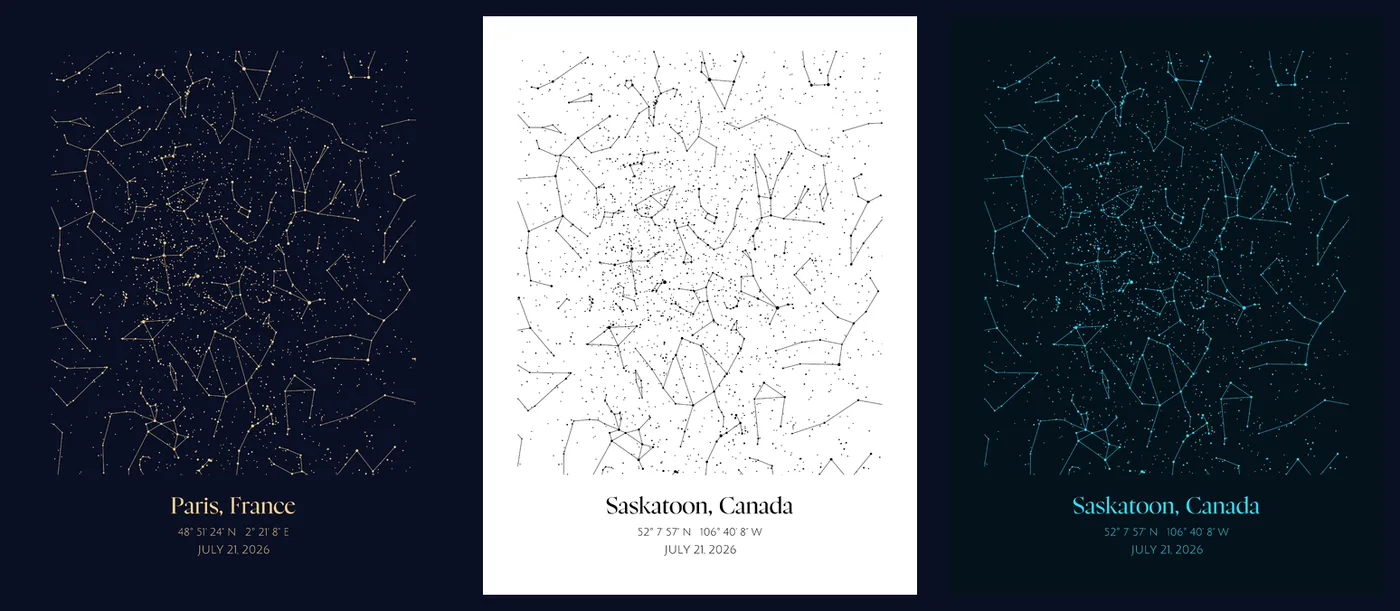
A star map of the night someone was born, the evening you got engaged, or the date you said goodbye makes a keepsake people treasure. This tool uses a real catalogue of over 5,000 stars and the classic constellation figures, and computes exactly how the sky looked overhead from the place and moment you choose. Style it as glowing art for a print, or switch to laser mode for a clean layered SVG where the stars engrave, the constellations score, and the frame cuts.
What You'll Need
- Printing: any home printer or a print shop, plus paper or card in your chosen size, and a frame
- Laser engraving: wood, acrylic, or slate, and the layered SVG export
- Laser cutting: the SVG export with the frame layer set to cut
- Extras: nothing to install, everything runs in your browser
Step 1 - Pick the place
Choose a city from the quick list, or type any latitude and longitude for the exact spot. The coordinates are printed on the poster and drive the sky calculation, so a birthplace, a wedding venue, or a childhood home all work.
Step 2 - Set the date and time
Select the month, day, and year, and optionally a precise time. The stars and constellations move to match the exact moment. Leave the time off for a classic evening sky around 9 pm local.
Step 3 - Choose a shape and style
- Full: a full-sky rectangle that fills the poster edge to edge.
- Circle: the classic round star chart with the horizon as the rim.
- Heart: the visible sky clipped to a heart, made for romantic keepsakes.
- Pick a palette like Night Gold, Blueprint, Terminal Green, or Black & White, or set your own sky and star colours, and toggle the constellation lines and coordinate grid.
Step 4 - Add your words
Add the place name, coordinates, the date, and a personal dedication, each in your choice of font. Choose whether the text sits below the sky, above it, or split across the top and bottom, and add a line, double, or frame border.
Step 5 - Export
Download a high-resolution PNG or a print SVG for framing, or a laser SVG where every part exports as its own coloured group. You can also open the design straight in the Design Editor.
Choose Your Build Method
Home and print-shop printing
- Match the poster size to your paper or frame, or set a custom size in millimetres.
- Keep the glow on for a rich night-sky look, or use a light palette for a minimalist print.
- Print the PNG at home, or send the SVG or PNG to a print shop for large or premium stock.
- Frame it with the same aspect ratio so the sky fills the frame without cropping.
Make It Yours
- Birth-night star map with the baby's name and birth details as the dedication.
- Engagement or wedding sky in a heart shape with the couple's names.
- Anniversary poster of the night you met, framed for the bedroom.
- Memorial star map of a loved one's date in a quiet Blueprint palette.
- Engrave the night sky onto a wood plaque using the layered SVG.
- Cut a circular acrylic star chart with the frame layer set to cut for an edge-lit night light.
Keep up with MyLaserTools.
Email me about new tools, product updates, tutorials, and occasional MyLaserTools offers. Unsubscribe at any time.
© 2026 MyLaserTools.com. All rights reserved.