

Making a game-day stadium keepsake with the Stadium Map preset
Difficulty: Easy. Time: under an hour of design time, then your printer's run. Best method: full-colour / UV print (it's a colour-led close-up). A laser version works as a single engraved tonal tile.
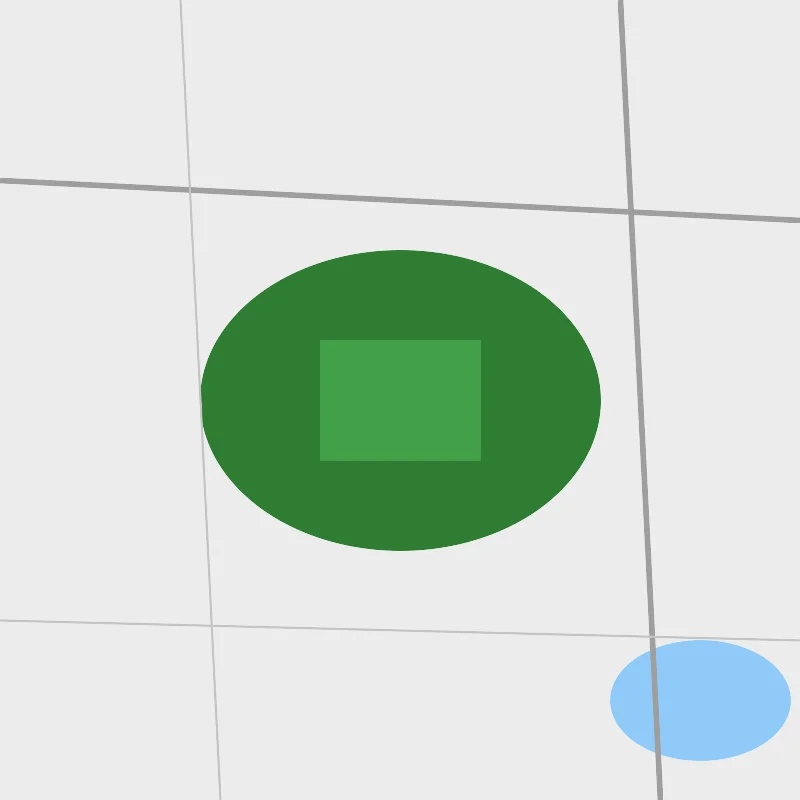
This is a print-first preset built around a single stadium. The Stadium Map centres on Wembley Stadium in London at close zoom, with the pitch and stadium grounds in a deep team green standing out over the surrounding buildings and streets. Everything is solid colour fill, so the design reads as a clean, modern close-up rather than a city-wide map.
The square frame keeps the stadium dead centre with just enough of the neighbouring roads and buildings to set the scene. It's made for sports-fan gifts, season-ticket keepsakes and the day-we-were-there mementos - recolour the greens to a club's colours and add the team name and date to make it personal.
What You'll Need
UV print / sublimation
- The exported high-res PNG (4096 px)
- UV flatbed printer, or a sublimation setup with a coated blank (wood, hardboard, aluminium)
- Light or white blanks let the team green and pitch colours stay vivid
Poster / paper print
- The exported high-res PNG sent to a photo lab or printed on matte or textured art paper
- A frame; a clean dark or club-coloured frame suits the modern look
Laser (optional, single tile)
- A light wood or coated tile that engraves with contrast
- Any diode or CO2 laser
- Note: the team colours won't survive a laser - use it for a monochrome engraved version
Step 1 - Start from the preset
Open the Stadium Map preset. It opens on Wembley Stadium in London at zoom 15 in a square (1:1) frame, centred tightly on the stadium and the streets around it. Pan so the stadium sits exactly in the middle of the frame; its green grounds are the anchor of the whole design. Zoom in to 15.5 to fill the frame with just the stadium, or out to 14.5 to bring in more of the surrounding district.
Step 2 - Tune the layers
The preset is a single layer group, "Stadium district", and every feature is Solid fill or line - there are no cut or score layers, so the palette is your only dial:
- Land background - Solid fill, light grey
#ECECEC. The calm base that lets the stadium and pitch greens pop. - Water - Solid fill, soft blue
#90CAF9. Any nearby canal, pond or river reads as a gentle blue accent. - Buildings - Solid fill, warm grey
#D6D2CC. The blocks of the surrounding district that frame the stadium. - Stadium grounds - Solid fill, team green
#2E7D32. The grounds of the stadium itself - the headline colour and the heart of the design. - Pitches - Solid fill, lighter green
#43A047. Nearby pitches and the playing surface in a brighter green. - Primary roads - Solid line, mid grey
#9E9E9E(width 3). The main approaches into the stadium. - Secondary roads - Solid line, grey
#B0B0B0(width 2.2). The connecting streets of the district. - Streets - Solid line, light grey
#C4C4C4(width 1.4). The fine local mesh around the ground.
The greys and blue are deliberately muted so the green grounds carry the eye. To make it a club piece, recolour the Stadium grounds and Pitches greens to your team's colours and keep the streets neutral so the stadium stays the focus.
Step 3 - Export
- UV / sublimation: export the high-res PNG (4096 px). Keep the Background toggle on so the grey base prints as a solid field, or turn it off for a transparent background to let a natural wood blank show through.
- Poster: same high-res PNG, sized to your paper. The square 1:1 frame suits a 12x12 or 20x20 print.
- Laser (optional): export the per-layer SVG ZIP, ignore the colours, and engrave the stadium outline and road network as a single tonal pass.
Choose Your Build Method
UV print / sublimation
- Export the high-res PNG. Leave the Background on for a clean grey field that lets the team green stand out, or turn it off and print onto a natural wood blank to let the grain show through.
- For sublimation, mirror the image and press onto a wood, hardboard, or aluminium blank per its spec. Light blanks keep the green vivid.
- On a UV flatbed, print straight onto wood, acrylic, or hardboard. A white underbase keeps the team green opaque on darker stock.
- A satin or gloss finish suits the clean modern look - gloss makes the pitch greens read brightest.
Poster / paper print
- Send the high-res PNG to a photo lab or print on matte art paper for a framed game-day keepsake.
- Frame in a clean dark or club-coloured frame to complete the look.
- The 1:1 square crop is set for you - keep it square, or re-export after switching the aspect ratio for a portrait format with room for the team name and date below.
Make It Yours
- Centre it on another famous ground: Camp Nou in Barcelona, Old Trafford in Manchester, the Maracana in Rio, or Anfield in Liverpool - any stadium with recognisable surrounding streets works.
- Recolour the Stadium grounds and Pitches greens to your club's colours - red and white, blue and white, or black and gold - for an instant team piece.
- Add the team name and the match date under the map for a true day-we-were-there keepsake.
- Keep the streets and buildings neutral grey so the recoloured stadium stays the clear focus of the frame.
- Print large (20x20 square) framed for a season-ticket-holder gift, or small as a set of matchday coasters.
- Turn the Water layer off if there's no water near the ground, for a cleaner grey-and-green design.
- Add the stadium name and coordinates in a bold modern typeface for a clean stadium-poster finish.
Keep up with MyLaserTools.
Email me about new tools, product updates, tutorials, and occasional MyLaserTools offers. Unsubscribe at any time.
© 2026 MyLaserTools.com. All rights reserved.