

Crea etiquetas de regalo personalizadas con el generador de etiquetas de regalo
Nivel de dificultad: fácil. Tiempo: 5 minutos por etiqueta; se pueden preparar todas las etiquetas necesarias para las fiestas en una sola noche. Métodos más recomendables: contrachapado cortado con láser, etiquetas multicolores impresas en 3D.
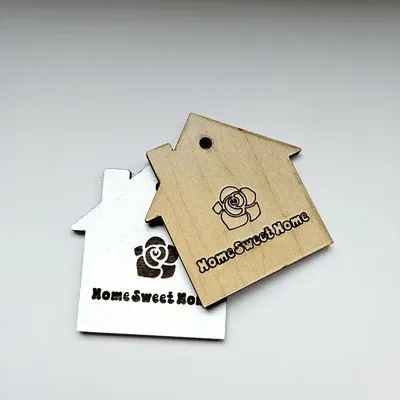
Las etiquetas de papel se tiran; las de madera vuelven en los regalos del año siguiente. Elige una Forma (la clásica etiqueta de regalo con esquina angulada, un cuadrado o una pequeña casa, ideal para inauguraciones), escribe el nombre y la herramienta lo renderizará como texto calado conectado dentro de la etiqueta con un agujero para el cordel en la parte superior. Añade un Símbolo (corazones, copos de nieve, estrellas) y colócalo con los deslizadores de desplazamiento, ajusta el Tamaño del agujero para tu cordel y exporta.
What You'll Need
- Corte láser: contrachapado de 3 mm apto para láser o acrílico de colores
- Impresión 3D: cualquier impresora FDM; un cambio de color hace que el nombre resalte sobre la etiqueta
- Acabado: cordel de panadero o cinta fina
Paso 1: Forma, nombre, símbolo
Elige la forma y escribe el nombre en Texto; las letras se renderizan como calados, por lo que las fuentes redondeadas y en negrita mantienen cada contraforma (los huecos de la e, a, o) unida. Añade un Símbolo y ajústalo con Desplazamiento de símbolo X / Y hasta que equilibre el nombre; el Tamaño del símbolo hace que quede subordinado al texto.
Paso 2: orificio y tamaño
- Establezca el Tamaño del agujero en 3-4 mm para cordel o 5 mm para cinta.
- Las etiquetas de entre 60 y 80 mm de ancho quedan muy bien en los regalos sin llamar demasiado la atención.
- Cambia las Unidades a pulgadas si lo prefieres.
Paso 3: Exportar
Descarga el archivo SVG para corte láser, o establece un grosor y obtén el STL/3MF para impresión; la exportación 3D eleva el borde de la etiqueta y el texto como un modelo en capas.
Choose Your Build Method
Corte por láser
- Corte las etiquetas en grupos: anide una docena de nombres en una sola hoja y ejecute el corte una sola vez.
- El nombre se recorta como si fueran agujeros en la etiqueta, por lo que se puede pegar la etiqueta a una cartulina o tela de color contrastante para que el color se vea a través de las letras de inmediato.
- Lija ligeramente, pasa el cordel y átalo al paquete.
- Las etiquetas de acrílico en colores de temporada (rojo, blanco mate y dorado brillante) se conservan año tras año.
Make It Yours
- Preparen una etiqueta para cada miembro de la familia y úsenlas de nuevo cada Navidad; así se convertirán en parte de la tradición.
- Forma de casa + nombre de los nuevos propietarios + el año es un adorno para regalo de inauguración de casa que se hace en cinco minutos.
- Utilice el símbolo de un copo de nieve para representar el mes de diciembre, corazones para febrero y estrellas para los cumpleaños.
- Ensarta varias tarjetas con nombres en un hilo para crear una guirnalda que puedas usar como decoración para una mesa de fiesta.
- En lugar de usar una etiqueta de papel para identificar una bolsa de regalo, átala al cuello de una botella de vino.
- Grabe las líneas «Para» y «De» en la parte posterior del objeto utilizando el software de su máquina de corte láser antes de realizar el corte.
- Las etiquetas de acrílico espejo sirven también como adornos para el árbol después de abrir los regalos.
Mantente al día con MyLaserTools.
Quiero recibir correos sobre nuevas herramientas, actualizaciones del producto, tutoriales y ofertas ocasionales de MyLaserTools. Puedo darme de baja en cualquier momento.
© 2026 MyLaserTools.com. Todos los derechos reservados.