

Making an architectural print with the Figure Ground Map preset
Difficulty: easy. Time: 30 minutes for a print, 1–2 hours engraved, 2–3 hours as a 3D plaque. Best methods, in order: UV printing, laser engraving, 3D printed plaque, sublimation.
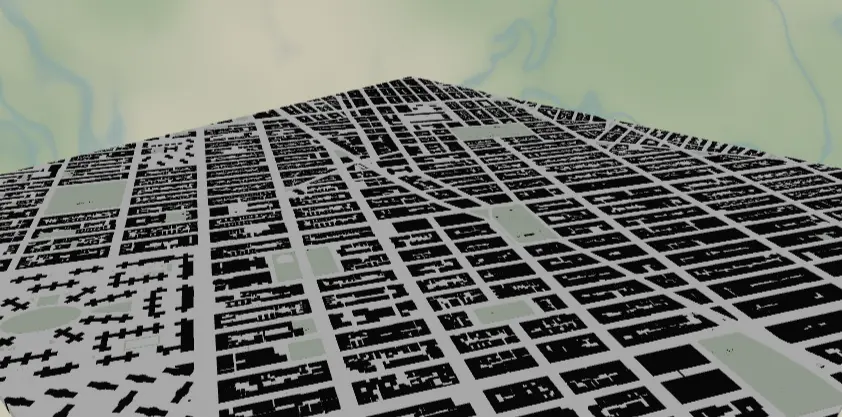
Figure-ground is the classic architecture-school drawing: every building footprint in solid black on white, nothing else but whisper-gray water and parks. This preset reproduces it straight from OSM building data, and the stark two-tone artwork is the most forgiving design in the whole set - it prints, engraves, and 3D prints beautifully because the contrast is absolute. Make a minimalist wall panel, a desk plaque, or an architect's gift.
What You'll Need
- UV printing: flatbed UV printer, white or clear acrylic, brushed aluminum, or maple plywood panels
- Sublimation: sublimation printer + paper, white poly-coated aluminum panel or hardboard, heat press, heat tape, butcher paper
- Laser engraving: CO2 or diode laser, light laser-grade plywood (maple/birch) or white-core two-tone acrylic - the black-on-white design maps 1:1 to engraved-on-raw
- 3D printing: any dual-color-capable printer; black + white filament is genuinely all you need
Step 1 - Start from the preset
Open the Figure-Ground Map preset. It loads Manhattan at zoom 14.2 - the neighborhood scale where individual building footprints read as texture but blocks still form patterns. That zoom is the sweet spot for this style: zoom out past ~13.5 and buildings shrink to pepper, zoom in past ~15 and you get a dozen big blobs. Search any city with good OSM building coverage (most of North America, Europe, Japan) and frame a district with personality - a street grid colliding with a diagonal avenue, a riverfront, a medieval core. Water along one edge gives the composition breathing room.
Step 2 - Tune the layers
One Solid layer group, Buildings - only four features, and that restraint is the style:
land-#FFFFFFpure white ground.water-#E3E3E1whisper gray. Deliberately subtle; darken to#CFCFCCif you want the shoreline to assert itself in print.landusePark-#DCE6D8faint sage, just enough to explain the building-free voids like Central Park.building-#111111, the entire show.
No road features at all - streets appear as negative white space between footprints, which is the figure-ground trick. Don't add roads; if a district looks empty, it's an OSM building-data gap, so pan to better-mapped blocks instead.
Step 3 - Export
- UV / sublimation: 4096 px PNG. On a white substrate, toggle Background off so the blank itself is the white ground - less ink, cleaner whites.
- Laser: combined SVG; the buildings are the only meaningful engrave geometry.
- 3D: 3MF for a two-tone stacked plaque.
- Enable small-polygon cleanup - city-scale building data is full of sheds and slivers that turn into specks at print size.
- Corner holes suit this design's gallery look for standoff wall mounting on anodized standoff spacers; add the compass icon overlay if the composition has a quiet corner for it.
Choose Your Build Method
UV printing
- Export the PNG with Background off (for white substrates) or on (for clear acrylic with a white underbase).
- In the RIP, size to your panel; this design holds up from 100 mm desk plaques to 600 mm statement pieces.
- On brushed aluminum, print the buildings with no underbase so the metal becomes the "white" - an instant architectural finish.
- Clean the substrate, register against the jig, print.
Sublimation
- Print mirrored at final size. Note that the
#E3E3E1water and#DCE6D8park tints are right at the edge of what sublimation can hold - they may wash to invisible. Either accept pure black-on-white (it looks great) or darken water to#C8C8C5before exporting. - Tape face-down to a white poly-coated panel.
- Press with the settings recommended for your material, paper, and inks, with butcher paper above and below.
- Peel hot; the solid black fields transfer densely and crisply.
Make It Yours
- Cities with dramatic block patterns: Barcelona's Eixample chamfered grid, Savannah's squares, Venice (water does the figure-ground for you), Tokyo's fine grain.
- Invert it: land
#111111, buildings#FFFFFF- the negative version UV-prints beautifully on black acrylic with Background off. - School-colors version: keep white ground, set
buildingto your team hex - that's exactly how the Campus Map preset works at closer zoom. - Warm gallery take: land
#F7F2E8, buildings#2B2B28for a softer archival-print feel on wood. - Switch export shape to circle for a porthole figure-ground; Manhattan's tip in a circle is iconic.
- Add a route layer in red
#E63946- one thin line through the black texture marks "our street" without breaking the style. - Print a 3-panel triptych of the same city at zoom 13 / 14.2 / 15.5 to show the grain coarsening.
- Heart export shape + Hanger hole turns your old neighborhood into an anniversary ornament.
Keep up with MyLaserTools.
Email me about new tools, product updates, tutorials, and occasional MyLaserTools offers. Unsubscribe at any time.
© 2026 MyLaserTools.com. All rights reserved.