

Handmade Tag Generator
Free leather & leatherette handmade tag generator for laser cutting. Design fold-over and flat tags with custom text, symbols, and stitching holes.
How To Use
Pick a tag style: Regular for a single flat design, or Foldable for a fold-over tag whose top and bottom mirror across a centre crease. Each sets up sensible holes and stitching to start from.
Choose a shape (rounded rectangle, capsule, stadium, oval, or octagon) and set the width and height in mm or inches to fit your beanie, knit, or crochet project.
Adjust the holes: placement (top + bottom, top, corners, or none), how many per edge, the diameter, and the margin from the edge. Add as many stitching holes as you need.
Add a stitch guide border (line, dashed stitch, or cut holes) for a sewn-on look, then enter your top text and bottom text with a symbol between them. Pick a font and nudge the position with the Offset X / Y sliders.
Click "Download SVG" and open it in LightBurn (affiliate link), Glowforge, xTool Creative Space, Epilog, or Trotec. Layers are colour-coded: red for cut (outline & holes), teal for score (stitch guide), and blue for engrave (text & symbol).
Material tip: Use PU (polyurethane) leatherette or genuine leather. Never laser PVC leatherette, it releases toxic hydrogen chloride fumes that are harmful to you and your machine.
Handmade Tag Examples
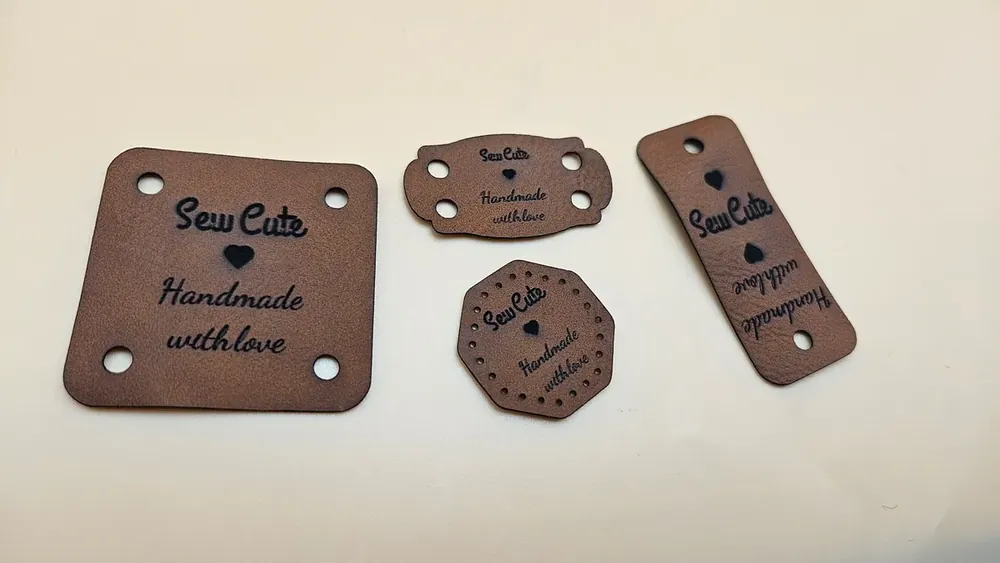
Real tags made with this tool, laser cut and engraved on rawhide PU leatherette.
- Material: Rawhide / Black Engraves Leatherette (PU)
- Text: Sew Cute / Handmade with love
- Styles: foldable corner-hole, sew-on stitch holes, and flat tags
Always use PU (polyurethane) leatherette or genuine leather. Never laser PVC, it releases toxic hydrogen chloride fumes that are harmful to you and your machine.
Frequently Asked Questions
Yes. The Handmade Tag Generator is 100% free with no limits, no watermarks, and no trial period. Generate and download as many files as you want, free forever.
Free laser-cut leather and leatherette tag generator. Make beanie, hat, clothing, and bag tags with custom text, symbols, and stitching holes.. Adjust the settings, preview your design in real time, and download a ready-to-make file in seconds.
It exports clean, machine-ready SVG vector files with separate cut and engrave layers where applicable. Files are generated instantly in your browser.
Laser cutters and engravers including Glowforge, xTool, LightBurn, OMTech, Epilog, Trotec, Thunder Laser, and any machine that accepts SVG or vector files.
You can use wood, acrylic, leather, MDF, plywood, cardboard, and paper for laser cutting and CNC. The generated files are standard formats compatible with any material your machine can handle.
No account or sign-up is required for the Handmade Tag Generator. It runs entirely in your browser, your designs never leave your device, and there is nothing to install.
Yes. A commercial license is included, so you can sell products made with the Handmade Tag Generator on Etsy, Amazon Handmade, Shopify, at craft fairs, or anywhere else. Attribution is appreciated but not required.
Visit the MyLaserTools Learning Center for a step-by-step Handmade Tag Generator guide, plus material tips and file-format help for laser cutting, CNC, and 3D printing. The guides walk you through every setting and how to prepare your files for your machine.
Open the Handmade Tag Generator guideAbout
Free customizable handmade tag generator for laser cutting leather and leatherette. Make professional beanie tags, hat tags, clothing tags, and bag tags, plus labels for knit hats, crochet projects, sweaters, and blankets, in fold-over or flat styles. Choose a shape, set dimensions, place stitching holes, add a stitch guide and custom top and bottom text with a symbol, then download SVG files compatible with Glowforge, xTool, Epilog, Trotec, and other laser cutters.
Keep up with MyLaserTools.
Email me about new tools, product updates, tutorials, and occasional MyLaserTools offers. Unsubscribe at any time.
© 2026 MyLaserTools.com. All rights reserved.