
Fairy Door
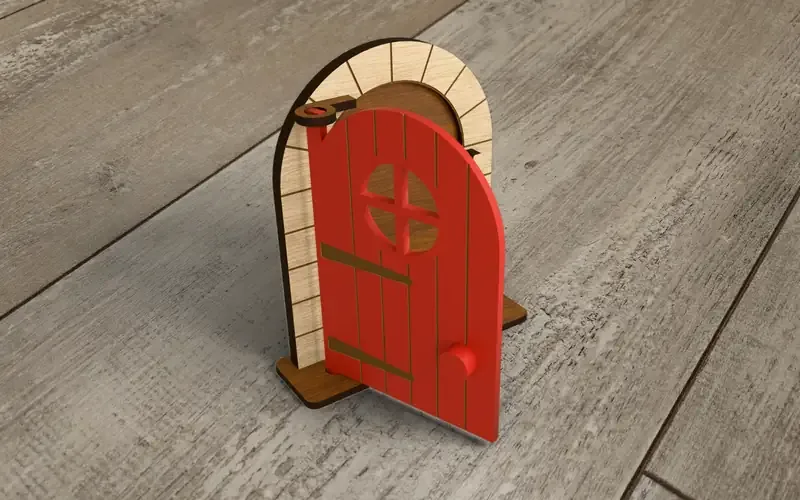
Fairy door: a little arched door that really opens, for a skirting board, the foot of a tree, a bookshelf or a garden wall, with a step in front, a knob, and…

Settings
Switch to Batch to make the same design for a list of names.
Door
Colours
Material
3D Preview
Photos
About this design
Laser cut & 3D print
Fairy door: a little arched door that really opens, for a skirting board, the foot of a tree, a bookshelf or a garden wall, with a step in front, a knob, and a keyhole behind to hang it. The door turns on pins cut on its own corner, one in the step and one in a bracket over the door, and closes against a stone arch with a back plate behind. It has planks, strap hinges and a round window with a cross, or a heart. Assembly: glue the arch on the back plate and both into the step. Stand the door's lower pin in the step, push the bracket in over the upper pin and glue it. Glue on the knob.
Personal useCommercial use
How to make it
- 1Change the settings. The preview updates after each change.
- 2Download the SVG for your laser, or open it in the Design Editor to add more to it.
- 3Like the design and add a photo of what you made below.
Questions
Yes. It is free to download and use under its licence.
Yes. Change the settings on this page and the preview updates as you go. When it looks right, download the file.
An SVG for your laser software. You can also open it in the Design Editor, or download STL and 3MF at the material thickness to print the parts.
The size follows the settings on this page, and the size box under the preview shows the result.
Set the material thickness to the sheet you cut. The slots and tabs follow it.
Yes. The licence covers personal and commercial use of the pieces you make.
Made by the community
Cut this one? Share a photo and a note about how it went and get 10 sparks right away.