


Coffee Shop Diorama Generator
Create a finger-jointed open diorama frame for laser cutting: back wall, left wall, floor and ceiling with skylight.
Examples
Build your own miniature café or reading room diorama with laser-cut finger-jointed panels, floating shelves and multi-pane windows.
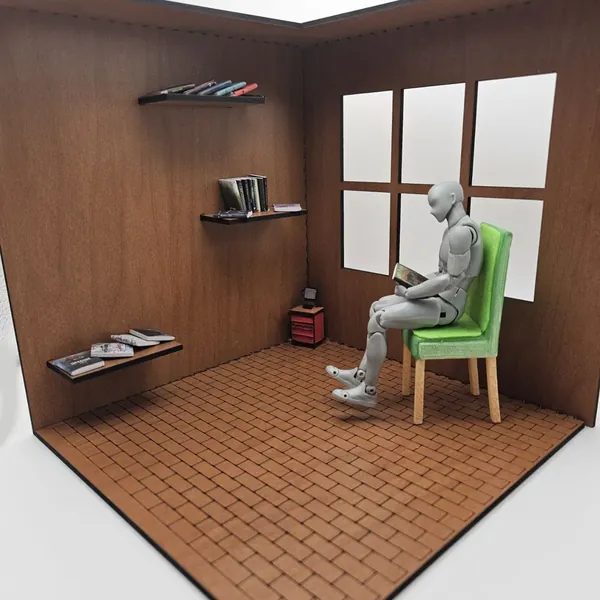
Materials used:
- Walls, floor & shelves: TruFlat® Cherry Plywood
Material Suggestions
For the cleanest engraved texture and finger joints, use TruFlat® Cherry Plywood with its flat, void-free surface giving sharp cuts and a warm wood tone perfect for dioramas.
How To Use
Set your diorama dimensions (width, depth, height) and material thickness. All dimensions are interior measurements.
Choose your wall options: add a ceiling with optional skylight cutout, cut windows into the back or left wall, and select a window style (square, 2×2, or 3×2 panes).
Add floating shelves to the back or left wall. Use the seed value to randomise shelf positions and the 3D preview to inspect the layout before cutting.
Optionally add a custom name plaque: choose a font, enter your text, pick a symbol, and adjust the plaque size. It is generated as a separate laser-cut piece.
Download the SVG and laser cut all panels. The layout includes the back wall, left side wall, floor, optional ceiling, shelf pieces, and name plaque, all finger-jointed and ready to assemble.
Assembly: Slot the floor into the back wall and left wall first, then press all finger joints together. Insert shelf legs into their slots before closing the assembly. If you have a ceiling, fit it onto the top tabs last.
Frequently Asked Questions
Yes. The Coffee Shop Diorama Generator is 100% free with no limits, no watermarks, and no trial period. Generate and download as many files as you want, free forever.
Free open-front diorama scene frame generator with finger joints: back wall, left wall, floor and ceiling with skylight cutout. Adjust the settings, preview your design in real time, and download a ready-to-make file in seconds.
It exports clean SVG files for laser cutting, CNC, and vinyl, plus STL and multi-colour 3MF files for 3D printing. Everything is generated instantly in your browser.
Laser cutters and engravers including Glowforge, xTool, LightBurn, OMTech, Epilog, Trotec, Thunder Laser, and any machine that accepts SVG or vector files. CNC routers and mills via SVG import in tools like Vectric, Carbide Create, Easel, and Fusion 360. 3D printers via slicers such as Bambu Studio, PrusaSlicer, OrcaSlicer, and Cura, with 3MF files carrying colour data for multi-colour prints.
You can use wood, acrylic, leather, MDF, plywood, cardboard, and paper for laser cutting and CNC, and PLA, PETG, ABS, TPU, and any filament your printer supports for 3D printing. The generated files are standard formats compatible with any material your machine can handle.
No account or sign-up is required for the Coffee Shop Diorama Generator. It runs entirely in your browser, your designs never leave your device, and there is nothing to install.
Yes. A commercial license is included, so you can sell products made with the Coffee Shop Diorama Generator on Etsy, Amazon Handmade, Shopify, at craft fairs, or anywhere else. Attribution is appreciated but not required.
Visit the MyLaserTools Learning Center for a step-by-step Coffee Shop Diorama Generator guide, plus material tips and file-format help for laser cutting, CNC, and 3D printing. The guides walk you through every setting and how to prepare your files for your machine.
Open the Coffee Shop Diorama Generator guideAbout
The Coffee Shop Diorama Generator creates a custom open-front scene frame perfect for laser cutting. It outputs finger-jointed panels: back wall, left side wall, floor, and an optional ceiling with skylight cutout. The open front and right side make it ideal for miniature café or shop dioramas, shadow boxes, book nook inserts, and display scenes.
Add randomised floating shelves on the back or left wall, cut windows in any style (square, 2×2, or 3×2 panes) with adjustable size and position. A custom name plaque with connected text, font selection, symbol and adjustable size is generated as a separate laser-cut piece.
Fully custom: set width, depth, height, material thickness, finger joint width and spacing, then download a single SVG ready to cut. Compatible with all laser cutters including Glowforge, xTool, Epilog, and Trotec. Use the 3D diorama preview to inspect the assembled scene before you cut.
Keep up with MyLaserTools.
Email me about new tools, product updates, tutorials, and occasional MyLaserTools offers. Unsubscribe at any time.
© 2026 MyLaserTools.com. All rights reserved.