

Moving Gear Wall Clock
A laser-cut wall clock with exposed gears that really turn, driven by a quartz movement.
Settings
Preset
What to build
Gears
Face
Style and fit
Numbers
- Your clock is 151 mm across (about 5.9 inches).
- One clock motor turns the hands and spins all the gears together, so you only fit a single movement.
- If the wheels get big and heavy, one motor can struggle. Switch to the turning-gears style to add a second motor just for the gears.
Vector Export
3D Print Design
Every part is extruded to the depth you set. Wheels want thin stock, plates want thicker.
3MF preserves richer print metadata when your slicer supports it.
Generate a design to see the 2D preview
Generate a design to see the export preview
Examples
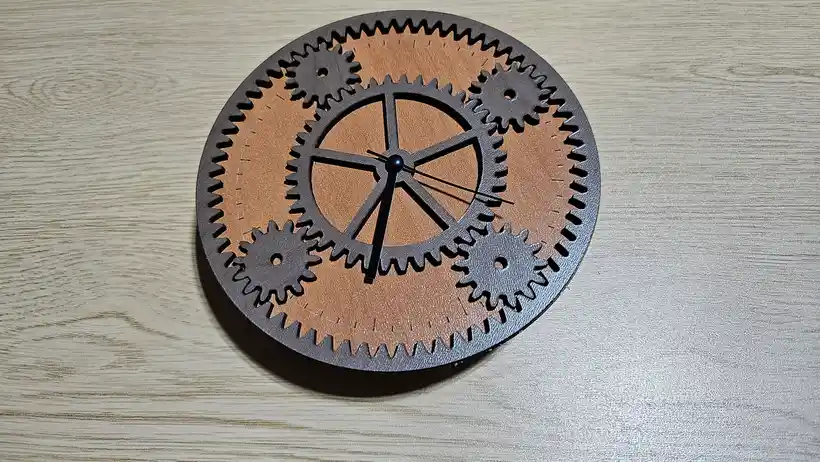
Laser cut. The dark walnut ring gear and cogs sit over a warm cherry backplate, turned by a hidden quartz movement.
Materials used:
- TruFlat® Cherry Plywood for the backplate and centre wheel
- TruFlat® Walnut Plywood for the ring gear and outer wheels
Set the module and arbor bore to match your sheet thickness and quartz movement shaft before cutting.
Material used:
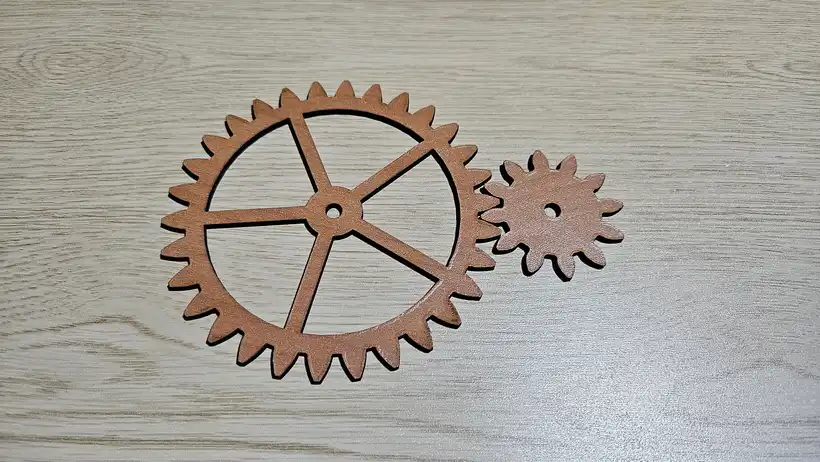
Individual wheels cut clean with sharp involute teeth, ready to mesh around the centre.
How To Use
Frequently Asked Questions
Yes. The Moving Gear Wall Clock is 100% free with no limits, no watermarks, and no trial period. Generate and download as many files as you want, free forever.
Free laser cut gear clock with exposed cog wheels that really turn, driven by a standard quartz movement.. Adjust the settings, preview your design in real time, and download a ready-to-make file in seconds.
It exports clean SVG files for laser cutting, CNC, and vinyl, plus STL and multi-colour 3MF files for 3D printing. Everything is generated instantly in your browser.
Laser cutters and engravers including Glowforge, xTool, LightBurn, OMTech, Epilog, Trotec, Thunder Laser, and any machine that accepts SVG or vector files. CNC routers and mills via SVG import in tools like Vectric, Carbide Create, Easel, and Fusion 360. 3D printers via slicers such as Bambu Studio, PrusaSlicer, OrcaSlicer, and Cura, with 3MF files carrying colour data for multi-colour prints.
You can use wood, acrylic, leather, MDF, plywood, cardboard, and paper for laser cutting and CNC, and PLA, PETG, ABS, TPU, and any filament your printer supports for 3D printing. The generated files are standard formats compatible with any material your machine can handle.
No account or sign-up is required for the Moving Gear Wall Clock. It runs entirely in your browser, your designs never leave your device, and there is nothing to install.
Yes. A commercial license is included, so you can sell products made with the Moving Gear Wall Clock on Etsy, Amazon Handmade, Shopify, at craft fairs, or anywhere else. Attribution is appreciated but not required.
Visit the MyLaserTools Learning Center for a step-by-step Moving Gear Wall Clock guide, plus material tips and file-format help for laser cutting, CNC, and 3D printing. The guides walk you through every setting and how to prepare your files for your machine.
Open the Moving Gear Wall Clock guideAbout
This free moving gear wall clock generator draws a complete laser-cut clock two ways. In the planetary style a sun wheel sits on the movement shaft, planets orbit around it, and an outer ring gear rims a backplate cut to the same diameter, so a single quartz movement turns the hands and spins the whole gear set together.
The catch is load. A quartz movement is built to sweep light hands, so hanging a set of wooden or acrylic wheels on the same shaft adds weight and friction that can slow it, drain the battery, or stall it once the gears get big. That is what the turning-cluster style solves: fixed wheels surround a free centre wheel whose bore is oversized, so the main movement's shaft passes straight through to the hands without turning the gears, and a second quartz movement or a small motor behind one wheel drives the cluster through extra holes in the backplate. The two drives never load each other, so the gears can be as large as you like while the clock keeps perfect time. It is a decorative display clock, not a mechanical clockwork.
For gears on their own, including planetary sets, racks and non-circular pairs, use the Gear Generator.
Keep up with MyLaserTools.
Email me about new tools, product updates, tutorials, and occasional MyLaserTools offers. Unsubscribe at any time.
© 2026 MyLaserTools.com. All rights reserved.