

Free Book Nook Case Generator
Free custom book nook case generator for laser cutting. Design shelf-sized display cases with finger joints and an open front for acrylic panels.
How To Use
Set your book nook case dimensions. Standard book nooks are typically 10-15cm wide, 18-25cm tall, and 15-20cm deep to fit between books on a shelf.
Adjust material thickness to match your wood or acrylic. Fine-tune the finger width to control the joint fit (smaller values create tighter joints).
Choose your front panel style: tabs for a fully integrated transparent front, no panel for an open display, window for a removable front panel, or 2/3 windows for multiple clear acrylic panels on different sides.
Download the SVG and laser cut all pieces. Assemble using the finger joints and glue clear acrylic panels where indicated. Add LED lighting and create your miniature diorama inside!
Examples
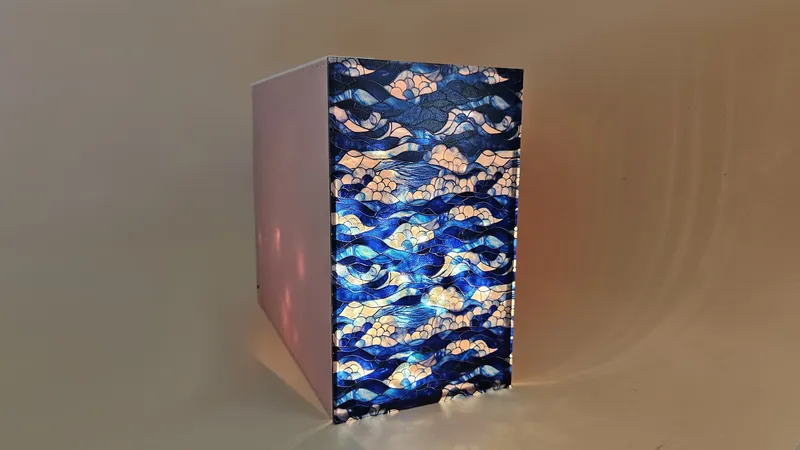
Create stunning book nook display cases for miniature dioramas. These shelf-sized cases feature an open front perfect for showcasing your artistic scenes.

Materials used:
- Case: Dual Finish Pastel Acrylic Sheet - Blush (matte side outside, glossy inside)
- Front panel: Stained Glass Collection
Material Suggestions
Create beautiful book nooks with dual-finish pastel acrylic for the case (matte outside, glossy inside for a professional finish). For the front window, stained glass acrylic adds a magical, artistic touch. You can also use clear acrylic for a minimalist look or laser-grade plywood for a rustic aesthetic.
Frequently Asked Questions
Yes. The Book Nook Case Generator is 100% free with no limits, no watermarks, and no trial period. Generate and download as many files as you want, free forever.
Free custom book nook display case generator for miniature dioramas, shelf-sized with open front for acrylic panels. Adjust the settings, preview your design in real time, and download a ready-to-make file in seconds.
It exports clean, machine-ready SVG vector files with separate cut and engrave layers where applicable. Files are generated instantly in your browser.
Laser cutters and engravers including Glowforge, xTool, LightBurn, OMTech, Epilog, Trotec, Thunder Laser, and any machine that accepts SVG or vector files. CNC routers and mills via SVG import in tools like Vectric, Carbide Create, Easel, and Fusion 360.
You can use wood, acrylic, leather, MDF, plywood, cardboard, and paper for laser cutting and CNC. The generated files are standard formats compatible with any material your machine can handle.
No account or sign-up is required for the Book Nook Case Generator. It runs entirely in your browser, your designs never leave your device, and there is nothing to install.
Yes. A commercial license is included, so you can sell products made with the Book Nook Case Generator on Etsy, Amazon Handmade, Shopify, at craft fairs, or anywhere else. Attribution is appreciated but not required.
Visit the MyLaserTools Learning Center for a step-by-step Book Nook Case Generator guide, plus material tips and file-format help for laser cutting, CNC, and 3D printing. The guides walk you through every setting and how to prepare your files for your machine.
Open the Book Nook Case Generator guideAbout
Our free book nook case generator creates custom display cases for miniature dioramas and book nook scenes. It generates high-quality SVG files compatible with all laser cutters including Glowforge, xTool, Epilog Laser, and Trotec Laser. Book nooks are shelf-sized decorative scenes that fit between books on your bookshelf, creating magical miniature worlds. The generator creates 5 sides with precise finger joints and an open front panel where you attach a clear or stained glass acrylic panel. Customize dimensions to fit your bookshelf (typically 10-15cm wide, 18-25cm tall, 15-20cm deep). Perfect for LED-lit dioramas, miniature street scenes, fantasy landscapes, and artistic displays. Use dual-finish acrylic for a professional matte exterior and glossy interior finish. Download your SVG and create stunning book nook displays!
Keep up with MyLaserTools.
Email me about new tools, product updates, tutorials, and occasional MyLaserTools offers. Unsubscribe at any time.
© 2026 MyLaserTools.com. All rights reserved.