

Engraving a contour map with the Topo Score Lines preset
Difficulty: Beginner (one sheet, one engrave pass). Time: under an hour. Best method: laser engraving.
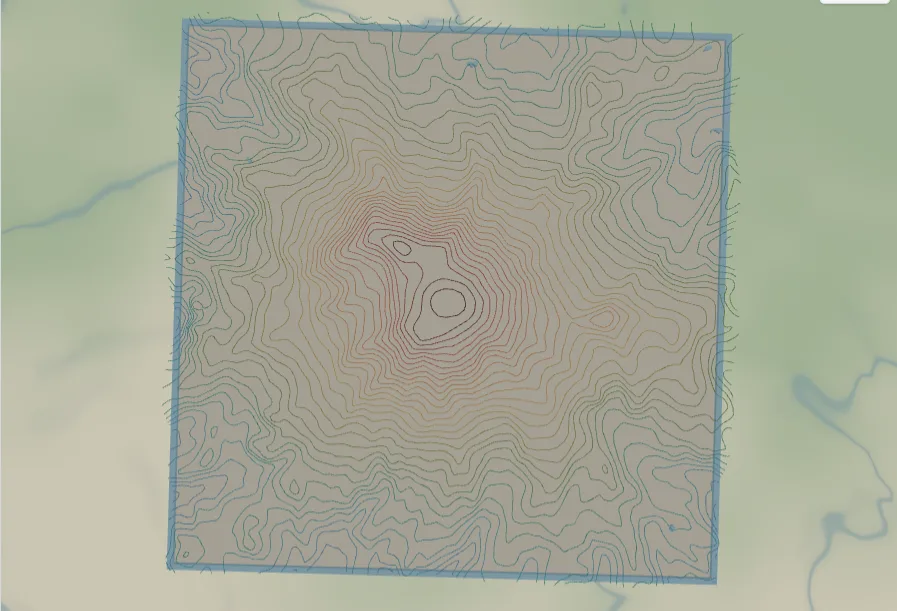
Where the Topography preset stacks cut plates into 3D relief, this one keeps everything on a single sheet and marks the contours as thin engraved score lines - the look of a printed USGS contour map, burned into wood, slate, or anodized metal. It loads on Mount Rainier, whose isolated cone makes clean concentric rings, and works anywhere with vertical relief.
What You'll Need
Laser engraving
- One sheet of stock - laser plywood, basswood, slate, leather, or anodized aluminium all take a crisp score line
- Laser cutter or diode laser (engrave/score settings, not cut-through)
- Optional: a contrasting fill or paint rub to make the scored lines pop
Step 1 - Start from the preset
Open the Topo Score Lines preset. It loads on Mount Rainier at zoom ~11.7 - the cone fills the frame with nested contour rings. Search your own mountain and keep zoom around 11.5–13 so the rings stay legible and don't crowd into solid bands. Because every line lands on one sheet, denser terrain reads fine here - you are engraving, not stacking.
Step 2 - Tune the layers
- Topography - the contour group ships in Score mode, so each elevation renders as a thin engraved line. Open the group's Edit dialog (or any single band) to switch the whole set between Score, Solid line (cut contours at an adjustable width), and Fill (stacked plates, the Topography preset's look). Leave it on Score for the engraved-map style.
- Water - Solid fill,
#BFE3F2. Lakes and rivers read as light shapes beneath the scored contours. - Backplate -
#f5f1e6warm paper. The single sheet the whole map sits on; recolor it to match your material.
Score line weight: in Solid line mode a Line Width slider sets the contour thickness; Score is locked to a thin marking pass, which is what you want for an engraved map.
Step 3 - Export
- Laser: a single SVG with the contours as score paths and the border as the cut outline. Send the scored lines to an engrave/score layer and the frame to a cut layer in your laser software.
- UV print: high-res PNG for a flat printed contour poster.
Choose Your Build Method
Laser engraving
- Map the layers in your laser software: contours to a score/engrave operation, the outer frame to a cut.
- Test on scrap first - score lines want low power and high speed so they mark cleanly without charring or cutting through.
- Engrave the contours, then cut the frame last so the sheet stays registered until the final pass.
- Finish: rub a contrasting wax or paint into the scored lines and wipe the surface, or leave the natural burn for a tonal look.
Make It Yours
- Great subjects: a home mountain, a hiked summit, a ski hill, a memorable trail high point.
- Switch the contour group to Solid line and raise the Line Width for bolder cut contours instead of fine score lines.
- Recolor the backplate to your material (slate gray, walnut, kraft) and the water to match.
- Add a route layer tracing a climb or descent over the contours.
- Tighten the elevation range in the band editor to bracket lower terrain - hills and coastlines work, not just alpine peaks.
New free tools, every month.
New laser cutting tools, what's coming next, and features we're building right now. Only MyLaserTools.com news. No spam, ever.
© 2026 MyLaserTools.com. All rights reserved.