

Tracing photos into clean outlines with the Photo to Connected Outline Generator
Difficulty: easy. Time: 10 to 20 minutes of tuning, fast machine time. Best methods, in order: laser engraving and cutting, 3D printing. Photos stay in your browser.
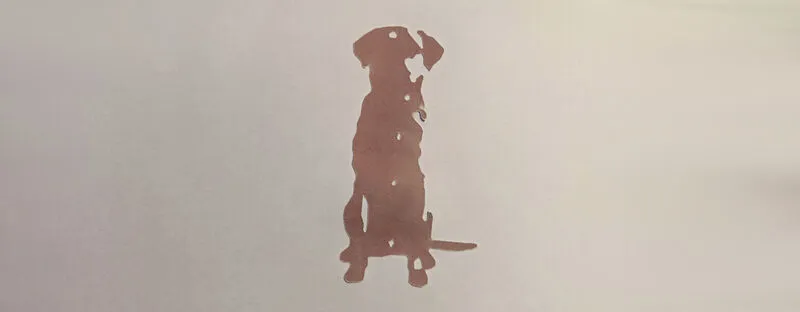
Where the halftone tool rebuilds tone, this tool extracts shape: it thresholds your photo into light and dark, then traces the boundaries as smooth, closed vector outlines. The result is minimalist line art, a pet's silhouette, a face in three contours, a building's profile, that scores in seconds because the laser only draws the lines.
Closed paths are the superpower here: unlike open sketch traces, every region is a complete loop, so the same file can be scored as line art, cut as a silhouette, or extruded into a layered relief print. All processing is local; your photo never uploads.
What You'll Need
- Laser: laser cutter, 3 mm laser-grade plywood, acrylic, or leatherette for scored patches
- 3D printing: any FDM printer, one or two filament colors
Step 1 - Upload a photo
Open the tool and upload an image with a clear subject; profile shots, pets against plain walls, and architectural photos trace beautifully. Use Gamma, Brightness, and Contrast to separate subject from background before tuning the trace.
Step 2 - Tune the trace
- Threshold decides what counts as dark; sweep it slowly and watch the silhouette form. This one slider does most of the work.
- Pre-blur fuses freckle-level noise into bigger shapes; raise it when the trace looks shattered.
- Path Simplification smooths jittery edges into confident curves; a little goes a long way on faces.
- Min Region Size drops islands smaller than a few millimetres that would clutter the art.
- Invert swaps which side of the threshold becomes the outline; Add cut frame appends a border for cutting the panel out.
- Width sets the physical size with the Units toggle.
Step 3 - Export
Download the SVG for the laser, or set Base Thickness and Relief Height and export an STL/3MF where the traced regions stand proud of a base plate.
Choose Your Build Method
Scoring or cutting the outlines
- Import the SVG and assign the outlines to vector score for line art; an entire portrait scores in under a minute.
- Alternatively raster-fill the closed regions for a solid two-tone stamp of the subject.
- For a cut silhouette, pick the dominant outline and cut it through 3 mm plywood or acrylic.
- On leatherette, a light score makes crisp tattoo-style patch art.
- Cut the frame border last if you enabled it.
Make It Yours
- Pet silhouette cut from black acrylic for a minimalist memorial.
- Score a child's profile from a side photo, the modern take on Victorian silhouettes.
- Trace the family home and score it onto a housewarming plaque.
- Couple's silhouette from an engagement photo as a save-the-date master.
- Print a relief version as a touchable keepsake.
- Layer two thresholds of the same photo, cut from two wood tones, for depth.
- Score a motorcycle or car outline onto a garage sign.
- Run the outline as an engraving layer on a keychain or ornament from another tool.
New free tools, every month.
New laser cutting tools, what's coming next, and features we're building right now. Only MyLaserTools.com news. No spam, ever.
© 2026 MyLaserTools.com. All rights reserved.