

Making a paw-shaped pet-lover map with the Paw Print Map preset
Difficulty: Easy. Time: 20–40 minutes per piece. Best method: laser cutting and engraving - the export is a paw-shaped cutout, so the paw silhouette is the design. Lovely as a tag, a keepsake disc, or a pet memorial gift.
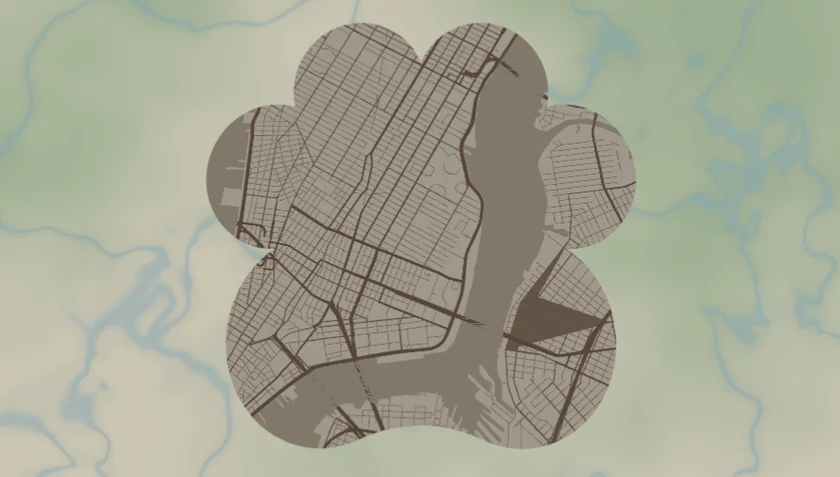
A city map cut into the silhouette of a paw print: warm taupe land (#EFE5D8) threaded with soft brown streets (#8C6B4F), framed by the paw export shape so the whole map comes off the laser as a paw-shaped tag or keepsake. It loads centred on the dog run at Tompkins Square Park in New York at zoom 13 - the exact patch of city where a dog spent its best afternoons.
A note on the colours: the taupe land and brown roads are a design target. A laser engrave is monochrome - it burns whatever the material colour is - so to reproduce the warm taupe-and-brown look you'd paint or stain the stock, use a tonal acrylic, or UV-print it. On natural leather or birch it engraves to a handsome warm-brown-on-tan paw, which suits the pet-keepsake mood perfectly.
What You'll Need
Laser (recommended)
- Paw-stock, ~50–90 mm: 3 mm Baltic birch, leather/leatherette for a soft tag, or tonal two-colour acrylic
- Laser cutter/engraver (diode or CO2)
- A split ring, snap clip, or ribbon if it's going on a collar, a leash, or a wall hook
- Optional brown paint pen to hand-fill the engraved roads, or wood oil to finish
Step 1 - Start from the preset
Open the Paw Print Map preset. It loads on the dog run at Tompkins Square Park, New York, at zoom 13, inside the paw silhouette. Re-search the dog park, beach, or trail where their dog ran. Framing tips for a shaped cutout:
- The paw shape has a big central pad and four toe beans - the densest, most detailed part of the map should sit in the large central pad where streets stay legible; the toes carry less detail.
- Zoom 13–14 is the sweet spot: at 60–90 mm you want a neighbourhood-scale map where individual roads survive the cut. Whole-city zooms turn to mush inside the small toe pads.
- Centre on the meaningful spot - the dog park entrance, the corner where you always walked, not the geometric city centre.
Step 2 - Tune the layers
One layer group, Paw map - every feature is a filled colour field (Solid mode), painting the inside of the paw silhouette:
land- warm taupe#EFE5D8, the base that fills the paw.water- soft sand-brown#CBB89C. Heads-up: it's close in tone to the land, so on a monochrome engrave water barely separates - push it darker if your map has a river or pond you want to show, or leave it as quiet texture and let the roads carry the design.roadsMotorway- brown#8C6B4F, width 4;roadsPrimary- brown#8C6B4F, width 3;roadsSecondary-#A07F62, width 2;roadsStreet-#B39377, width 1. The 4/3/2/1 widths give a clear hierarchy so major routes read even inside the small paw at tag scale.- Note there's no parks layer in this preset - it's land, water, and roads only, which keeps the engrave clean and fast on a small tag.
For engraving on plain wood or leather, invert the logic for speed: set land to no-engrave and roads to a deep burn, so the laser only scorches the streets and the paw cuts in minutes instead of rastering the whole pad. The natural material becomes the paw body, the burnt roads the detail.
Step 3 - Export
- Keep the paw export shape - that paw outline is your laser cut line, and the map features engrave inside it.
- Laser: download the combined SVG (or per-layer SVG). Assign the paw outline to cut and the map features to engrave.
- Enable the Hanger hole in the Mounting holes panel if it's going on a collar, a leash clip, or a wall hook - place it on the wrist/heel edge of the paw, ~3–4 mm for a split ring.
- Turn on small-polygon cleanup so stray street fragments don't pepper the engrave inside the toes.
- For a full-colour pet portrait gift, export the high-res PNG with Background on - the only way to print the taupe-and-brown literally.
Choose Your Build Method
Laser engrave + cut
- Load the SVG in your laser software at final size (60–90 mm is comfortable for a keepsake; 40–50 mm for a collar tag).
- Assign operations: map features = engrave, paw outline + hanger hole = cut, cut last so the piece stays anchored while it engraves.
- On wood: engrave the roads, then cut the paw; optionally trace the major roads with a brown paint pen or finish with wood oil to warm the taupe tone.
- On leather/leatherette: engrave at low power to scorch the surface, cut at higher power; leather makes an especially soft, giftable paw tag.
- On tonal two-colour acrylic: raster the roads through the cap layer to expose the contrasting core - taupe-and-brown without paint.
- Clean smoke residue, then add a split ring or snap clip through the hanger hole.
Make It Yours
- Pet memorial keepsake: centre the paw on the dog park where they loved to run and engrave the pet's name and dates along the heel of the paw.
- Collar charm: cut the paw small (40–50 mm) from leather or birch, add a split-ring hole, and engrave the dog's name and your phone number on the back.
- Two-paw set: one paw of the home neighbourhood for the dog, one of the cat's favourite windowsill block, hung together.
- Cat version: the paw shape works just as well centred on a cat's roaming territory - just swap the searched location.
- Leash hook plaque: cut a larger paw, engrave 'Time for walkies' and the local park map, and mount it by the door with a real hook below.
- Add a snap clip and it becomes a paw-shaped keychain or bag charm for the pet parent.
- Recolour to a cooler grey-blue palette and it reads as a wolf or husky keepsake; warm it up further for a golden retriever feel.
New free tools, every month.
New laser cutting tools, what's coming next, and features we're building right now. Only MyLaserTools.com news. No spam, ever.
© 2026 MyLaserTools.com. All rights reserved.