

Making a tropical Miami print with the Miami Coral Reef Map preset
Difficulty: Easy. Time: 30–45 minutes per pressed or printed piece. Best methods, in order: UV printing, sublimation, full-colour print on paper/canvas. This is a print-first preset - the colour is the whole point, so a monochrome laser engrave throws the design away.
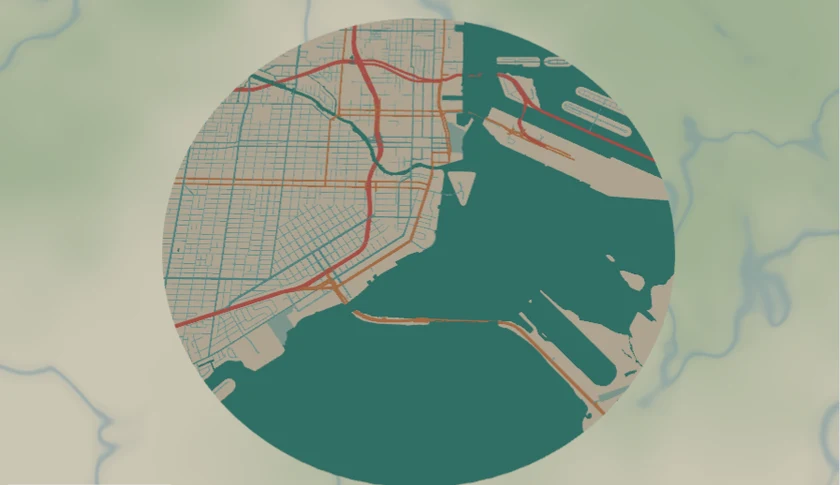
A circle-cropped city map in a sun-soaked reef palette: coral #FF6F61 and tangerine #FF9E4A roads laid over teal #1FB5A3 water and sandy cream #FDF5E6 land, with soft aqua side streets. It loads on Miami at zoom 12.8 - close enough to read the grid of South Beach and the bay, wide enough to keep the coastline and the causeways in frame.
This is deliberately a print-first design. Every layer is a flat colour field, so the magic lives in the palette - which means UV printing, sublimation, and plain full-colour printing reproduce it beautifully, while a laser engrave (monochrome by nature) would flatten all that coral and aqua into one burnt tone. Keep it in colour.
What You'll Need
UV printing
- Flatbed UV printer or a print service that accepts a high-res PNG
- White or clear acrylic, light wood panels, or coated metal/hardboard blanks
- White ink for an underbase if you print on clear acrylic, so the coral and teal stay saturated
Sublimation
- Sublimation printer + paper, heat press, heat tape, lint roller
- Poly-coated blanks: hardboard rounds, aluminium discs, ceramic tiles, or a poly tote/towel for the same shoreline on fabric
Full-colour print
- The exported high-res PNG (4096 px)
- An inkjet/giclée print on heavyweight matte paper or canvas, ready to frame
Step 1 - Start from the preset
Open the Miami Coral Reef Map preset. It loads Miami at zoom 12.8 inside a circle. The composition rule for this palette: let the teal water do the work - frame so the bay, the ocean, and the causeways carve a bold shape through the cream land. An all-land crop wastes the best colour in the set. Search any warm coastal city - Key West, San Juan, Cancún, Honolulu - and pan until water fills a good third of the disc. Zoom in a notch (13–13.5) for a tight neighbourhood, out a notch (12) to capture the whole bay shape.
Step 2 - Tune the layers
One Solid layer group, Coral city - every feature is a filled colour field (Solid mode), which is exactly what print wants:
land-#FDF5E6sandy cream, the base everything sits on.water-#1FB5A3teal, the hero fill. This is what makes the design read as Miami at a glance.landusePark-#BDE0D2pale seafoam green for parks and golf courses.roadsMotorway- coral#FF6F61, width 5. The boldest line: causeways and expressways.roadsPrimary- tangerine#FF9E4A, width 3.roadsSecondary-#66D2CEmid-teal, width 2.roadsStreet-#9AE3DEsoft aqua, width 1 - the texture layer. On a small print these fine aqua streets nearly melt into the cream; bump width to 1.5 or darken to#66D2CEif you want the grid to survive.
The whole palette is warm and high-key, so contrast between the coral roads and the cream land is what sells it. If the roads look washed out on your proof, nudge the motorway/primary tiers a shade deeper rather than touching the water.
Step 3 - Export
- UV / sublimation / print: export the high-res PNG (4096 px) with the Background toggle ON - the cream land is part of the design, you almost always want it printed. The one exception: printing onto a natural sand-coloured blank where the substrate can play the land - then toggle Background off for a transparent PNG.
- Keep the circle export shape - it's the postcard-perfect framing for this palette and reads great as a coaster, a disc, or a framed round print.
- Enable small-polygon cleanup - coastal OSM data is full of sliver islands and sandbar fragments that print as specks.
- Add a Hanger hole in the export modal only if you're making an acrylic ornament or disc to hang; for flat prints and coasters, leave it off.
Choose Your Build Method
UV printing
- Export the 4096 px PNG with background on.
- Size it in your RIP to the panel - the flat colour fields hold up large, so a 200–300 mm framed disc looks fantastic.
- On clear acrylic, lay down a white underbase first so the teal and coral stay vivid; on white acrylic or hardboard print direct.
- Register, print, and finish with a gloss varnish - here gloss helps, it makes the water look wet and the coral pop.
Sublimation
- Print the PNG mirrored at final size on sublimation paper.
- Lint-roll the blank, pre-press it for 5–10 seconds to drive out moisture, then tape the print face-down.
- Press at the settings recommended for your blank (poly-coated hardboard typically ~190–200 °C for 60 s); peel hot.
- For a tote or towel of the same shoreline, the big teal water field carries the design even when the width-1 aqua streets soften into the weave.
Full-colour paper / canvas print
- Export the 4096 px PNG, background on.
- Print on heavyweight matte paper or stretched canvas; the circle crop frames beautifully as a round print or matted inside a square frame.
- For a giclée look, send the PNG to a print lab at 300 dpi for your final size.
Make It Yours
- Cities where this palette sings: Key West, San Juan, Cancún, the Florida Keys, Honolulu, anywhere turquoise water meets pale sand.
- Sunset-reef swap: water
#1FB5A3stays, but recolour the roads to magenta#FF5FA2and gold#FFC247for a neon-tropical dusk version. - Coaster set: keep the circle shape and press a matching set of four discs of the same shoreline - one artwork, four blanks.
- Press a beach-house gift bundle: a framed round print, a matching coaster set, and a poly tote, all the same Miami crop.
- Drop a route layer in coral
#FF6F61tracing a sailing line or a morning beach run across the bay. - Switch the export shape to heart over the resort or beach where a couple got engaged - same reef palette, instant anniversary keepsake.
- For an acrylic disc to hang in a sunny window, add a Hanger hole and print on clear acrylic so the teal water glows when light passes through.
New free tools, every month.
New laser cutting tools, what's coming next, and features we're building right now. Only MyLaserTools.com news. No spam, ever.
© 2026 MyLaserTools.com. All rights reserved.