
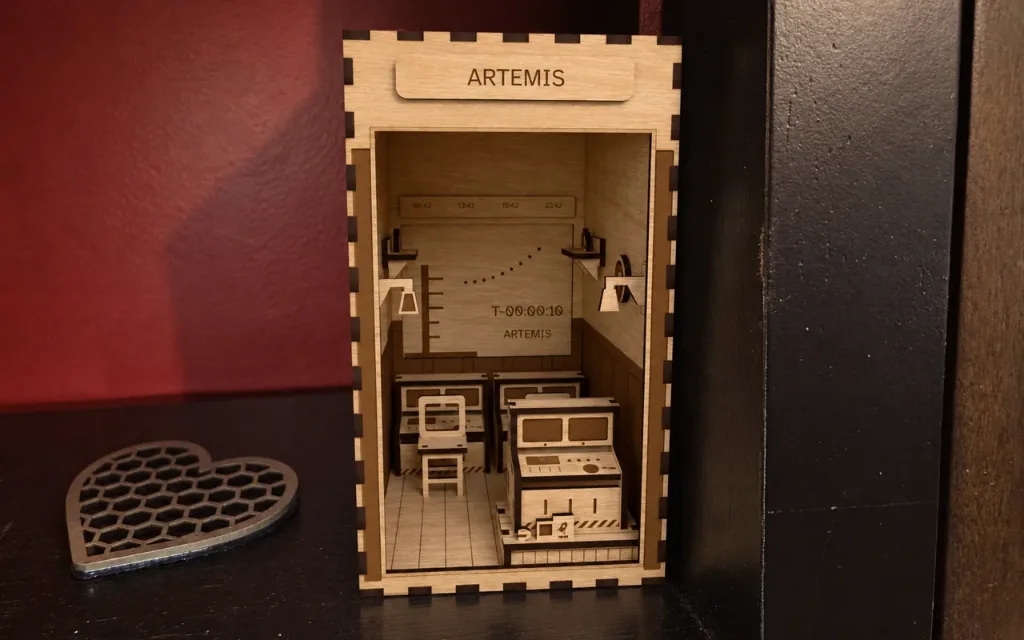
Go for Launch Mission Control Book Nook
Space centre book nook: "Go for Launch". Mission control, in the last minute of a countdown. The big screen fills the back wall: the rocket on its pad by the…

Impostazioni
Mission
Size
Material
Anteprima 3D
Foto
Informazioni su questo design
Taglio laser e Stampa 3D
Space centre book nook: "Go for Launch". Mission control, in the last minute of a countdown. The big screen fills the back wall: the rocket on its pad by the tower, the clock running down, the trajectory arcing to orbit. Two consoles face it with their chairs, and the flight director's console stands up on its tier behind them. The GO / NO GO board is all green but one; the clocks show four cities; the mission patch is on the wall. On the tier, beside a forgotten coffee, a family photo is taped up with a child's drawing of the rocket. A finger-jointed shell behind the control room's lit panels
Uso personaleUso commerciale
Come realizzarlo
- 1Cambia le impostazioni. L'anteprima si aggiorna a ogni modifica.
- 2Scarica l'SVG per il tuo laser, oppure aprilo nell'Editor di design per aggiungerci altro.
- 3Metti Mi piace al design e aggiungi qui sotto una foto di quello che hai realizzato.
Domande
Sì. È gratuito da scaricare e da usare secondo la sua licenza.
Sì. Cambia le impostazioni in questa pagina e l'anteprima si aggiorna mentre lavori. Quando ti convince, scarica il file.
Un SVG per il software del tuo laser. Puoi anche aprirlo nell'Editor di design, oppure scaricare STL e 3MF allo spessore del materiale per stampare i pezzi.
La dimensione segue le impostazioni di questa pagina, e il riquadro delle misure sotto l'anteprima mostra il risultato.
Imposta lo spessore del materiale uguale a quello del foglio che tagli. Linguette e fessure si adeguano.
Sì. La licenza copre l'uso personale e commerciale dei pezzi che realizzi.
Realizzato dalla community
Lo hai tagliato? Condividi una foto e una nota su come è andata e ricevi subito 10 scintille.