

Making an old-world wood print with the Vintage Parchment Map preset
Difficulty: easy. Time: 30–45 minutes printed, 45–90 minutes engraved. Best methods, in order: UV printing on wood, laser engraving (the best engraving palette of the flat presets), sublimation on hardboard. 3D printing is workable but the three near-identical road browns waste filament slots - notes below.
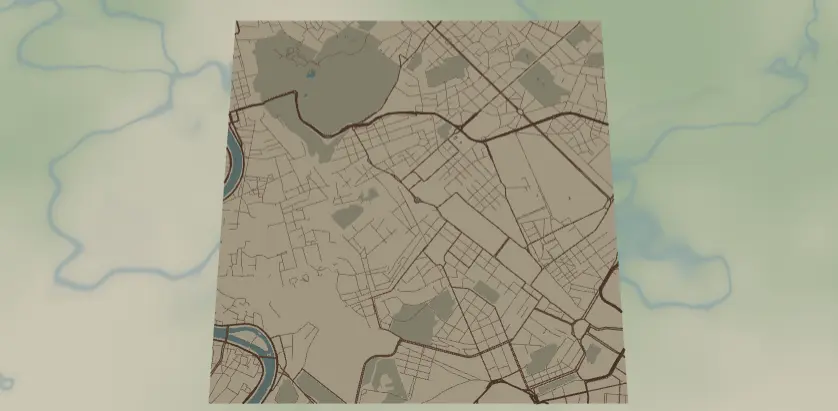
This preset dresses a modern city in old-world clothes: oxblood and sepia roads over a parchment ground, with muted teal water and olive parks. It's designed for UV printing on wood - toggle the background off and the wood grain itself becomes the parchment. Think study walls, whisky-bar decor, anniversary maps of Rome or Vienna.
What You'll Need
- UV printing: flatbed UV printer, light hardwood or quality ply panels (maple, birch, white oak - grain should be visible but calm), sanding sealer or sanded-smooth surface
- Sublimation: sublimation printer + paper, poly-coated hardboard or "vintage" textured sublimation panels, heat press, heat tape, butcher paper
- Laser engraving: diode or CO2 laser, light laser-grade plywood or hardwood; optional pre-stain for the parchment tone
- 3D printing: multi-color printer with parchment/cream, brown, teal, and olive filaments
Step 1 - Start from the preset
Open the Vintage Parchment Map preset. It loads Rome at zoom 13.4 - old-town scale, where the irregular medieval street pattern is the texture this style wants. The preset rewards cities with tangled historic cores: Rome, Prague, Lisbon, Istanbul, Edinburgh, Quebec City. Search yours and center on the old town, with the river (the #7FA8A4 teal is gorgeous in this palette) sweeping through a third of the frame. Rigid modern grids fight the vintage look - if your target city is gridded, lean into a riverfront or diagonal rail cut instead.
Step 2 - Tune the layers
One Solid layer group, Parchment map:
land-#EFE3C8parchment. This is the layer you'll hide for wood prints.water-#7FA8A4muted verdigris teal.landusePark-#C9C39Adry olive; subtle against the parchment, by design.- Roads, dark-to-light:
roadsMotorway#7A4A32width 4,roadsPrimary#7A4A32width 3,roadsSecondary#8F5E42width 2,roadsStreet#A3765Awidth 1.
The browns step from oxblood to tan as roads get smaller - a hand-inked hierarchy. All are dark enough to survive sublimation, and they convert to a clean grayscale ramp for engraving. If you hide the background for wood printing, check your wood tone against the road browns: on darker woods (walnut), lighten the streets to #B58A6C or they'll sink into the grain.
Step 3 - Export
- UV on wood (signature move): toggle Background off in the export modal for a transparent PNG - roads, water, and parks print directly onto the grain, and the wood is the parchment. Keep
landuseParkon or off to taste; it's subtle either way. - Sublimation: background ON; the parchment tone is part of the transfer.
- Laser: combined SVG (the grayscale ramp handles tonal separation in one pass) or per-layer ZIP for power control.
- 3D: 3MF after consolidating browns (below).
- A Hanger hole suits a small vintage ordinance-survey ornament; Corner holes + brass-toned anodized standoff spacers nail the explorer's-study look on larger panels. Enable small-polygon cleanup if your old town has confetti-sized park slivers.
Choose Your Build Method
UV printing
- Export the transparent PNG (Background off).
- Sand the wood panel to 220 grit and blow it clean; UV ink telegraphs every fiber.
- In the RIP, place over your panel size. Print color directly with no white underbase - letting the grain ghost through the inks is what makes it look aged.
- Register and print; a satin varnish pass deepens the inks without plasticky gloss.
Sublimation
- Print mirrored at final size, background ON.
- Tape face-down to poly-coated hardboard; this preset particularly suits "rustic" textured blanks.
- Press with the settings recommended for your material, paper, and inks, with butcher paper.
- Peel hot. The dark browns hold beautifully; expect the
#C9C39Aparks to soften toward the parchment - acceptable, they're a whisper by design.
Make It Yours
- Old-soul cities: Prague, Lisbon, Seville, Kyoto, Jerusalem, Quebec City, Charleston.
- Nautical-chart swap: water
#5E8C8Adeepened, land#F2E8CF, roads#3D4A52slate - instant harbor chart for port cities. - Wine-country swap: roads
#5C2E2E, parks#8A8B5Cover the same parchment for Tuscany or Bordeaux. - Turn on the compass icon overlay in the export modal - no preset wears it better.
- UV print onto a cork panel instead of wood; the cork texture reads as ancient paper.
- Add a route layer in faded ink
#4A3B2Atracing a grand-tour walking route through the old town. - Heart export shape over Rome or Paris with this palette = the vintage cousin of the Heart Keepsake preset.
- Make a "then and now" pair: this preset and the Blueprint preset of the same city, parchment beside drafting blue.
New free tools, every month.
New laser cutting tools, what's coming next, and features we're building right now. Only MyLaserTools.com news. No spam, ever.
© 2026 MyLaserTools.com. All rights reserved.