

Making stacked word art with the Stacked Text Generator
Difficulty: easy. Time: 10 to 20 minutes of design, plus machine time. Best methods, in order: laser cutting, 3D printing.
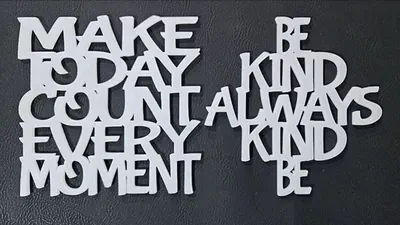
Stacked text is the trick behind those one-piece signs where HOME, SWEET, and HOME interlock vertically into a solid block. Each line overlaps the next just enough to fuse, so a whole phrase cuts out as a single shape with no gluing of separate words.
This tool lays out your lines, overlaps them by an adjustable offset, and unions everything into one path. Choose a triangle, square, or diamond silhouette for the overall stack, then export SVG for the laser or STL/3MF for the printer.
What You'll Need
- Laser cutting: laser cutter, 3 mm laser-grade plywood or acrylic; 3M tape if you back it with a second layer
- 3D printing: any FDM printer, one spool of filament
Step 1 - Enter your lines
Open the tool and fill in Text Lines, one entry per row of the stack. Short punchy words stack best: HOME SWEET HOME, EAT SLEEP CRAFT REPEAT, family names. Pick a bold Font; chunky letters give the rows more overlap surface to fuse through.
Step 2 - Shape the stack
- Shape picks the overall silhouette: triangle widens line by line, square keeps every line the same width, diamond swells in the middle and tapers at both ends. Order your words to suit; put the longest word at the widest row.
- Stacking Offset X nudges alternate rows sideways for a staggered look.
- Stacking Offset Y controls how deeply each row bites into the one above. More overlap means a stronger piece; less overlap keeps each word more legible.
- Thickness expands all strokes outward, which both bolds the look and strengthens thin joints.
Step 3 - Export
Download an SVG for laser cutting or an STL/3MF at your chosen extrusion depth for 3D printing. The whole stack is one merged path.
Choose Your Build Method
Cutting the stack
- Import the SVG; a typical shelf sign runs 150 to 250 mm wide.
- Zoom in on the row junctions before cutting; if any connection looks hairline, add Thickness or overlap in the tool and re-export.
- Cut from 3 mm plywood or acrylic with the face masked.
- For a two-tone piece, cut the same file slightly enlarged from a contrasting sheet and bond the layers with 3M 467 tape.
- Finish with oil or paint and stand it on a shelf; squares and diamonds usually self-stand at 3 mm or thicker.
Make It Yours
- HOME SWEET HOME in a triangle for the classic entryway sign.
- Stack a family's first names in a diamond as an anniversary gift.
- EAT SLEEP [hobby] REPEAT in a square for a craft-room shelf.
- Holiday version: MERRY in red acrylic stacked over XMAS in white.
- Stack a team name over a year for tournament keepsakes.
- Tiered-tray minis: 80 mm stacks of seasonal words, batch-cut a dozen per sheet.
- Print at 10 mm depth in marble-effect filament for a faux-stone desk ornament.
- Combine with the Single Line Text tool to score a date or names onto the stack after cutting.
New free tools, every month.
New laser cutting tools, what's coming next, and features we're building right now. Only MyLaserTools.com news. No spam, ever.
© 2026 MyLaserTools.com. All rights reserved.