

3D printing a miniature city skyline with the Skyline Map 3D preset
Difficulty: Easy. Time: 30 minutes of design, 2–5 hours of printing depending on size. Best methods, in order: 3D printing (it's built for it), UV print of the flat artwork.
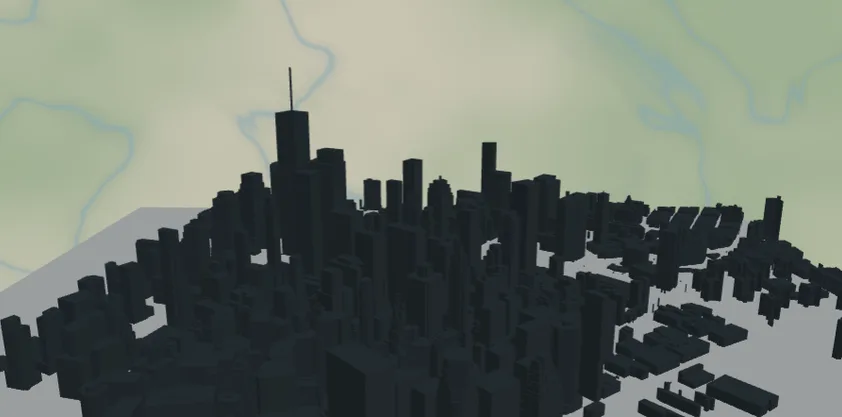
This preset turns a neighborhood into a miniature skyline. It starts from the same architectural figure-ground look as the Figure Ground Map - building footprints over a clean light plate - but with one twist: the 3D preview and the STL/3MF exports raise every single building to its real-world height pulled from map data. Skyscrapers become towers, brownstones stay low, and the result reads instantly as the city you know.
What You'll Need
3D printing
- Any FDM printer; PLA in a dark gray + light gray pairing prints closest to the on-screen look (multi-material or manual filament swap), or one color
- Slicer that accepts 3MF (Bambu Studio, PrusaSlicer, OrcaSlicer)
UV print / sublimation
- High-res PNG export of the flat figure-ground artwork onto a square blank - the height data only shows in the 3D outputs
Step 1 - Start from the preset
Open the Skyline Map 3D preset. It loads over Lower Manhattan's Financial District at zoom ~14.5 - One World Trade Center spiking out of a dense cluster of towers. Search your own city and aim for somewhere with real height variety - a downtown core, a waterfront with towers behind it, a university campus with one landmark high-rise. The buildings layer has "3D building heights" switched on (you'll find the toggle when editing the Buildings feature); flip it off and the preset behaves exactly like a flat figure-ground map.
Step 2 - Tune the layers
Two layers, pared down from the Figure Ground Map so the skyline is the whole story:
- Buildings - dark blue-gray
#37474Ffootprints with per-building extrusion enabled. Each building exports as its own shape carrying its height, so don't worry if the 2D preview looks identical to a flat map - the 3D preview is where it pays off. - Backplate - light
#ECEFF1plate the skyline stands on. Swap to match your base filament.
Heights come from the map's building data (render_height, or floor counts where that's all that exists). Areas without surveyed heights fall back to a low default, so dense city centers with good data make the most striking prints.
Step 3 - Export
- 3D printing: open the export dialog and check the 3D preview - buildings rise at true relative scale. Export 3MF for a two-color file (plate + buildings) or STL for single color.
- UV print: export the high-res PNG for the flat figure-ground artwork; the heights only apply to the 3D outputs.
- Keep the export area tight: the closer the zoom, the larger each building prints and the better small footprints survive slicing.
Choose Your Build Method
3D printing
- Open the 3MF in your slicer - the backplate and the building skyline arrive stacked with colors assigned. Single-extruder printers: slice the STL and add a filament change just above the plate for the two-tone look.
- Print flat, no supports - every building is a straight vertical extrusion. 0.2 mm layers; a 0.4 mm nozzle resolves individual rowhouses at 150 mm+ plate sizes.
- Scale advice: 150–250 mm plates make the heights readable. Below 120 mm, pick a zoomed-in downtown crop so each footprint stays printable.
- Tall slender towers print fine in PLA at this scale, but slow your outer-wall speed if the slicer flags short layer times at the spire tips.
Make It Yours
- Best subjects have height drama: Manhattan, Chicago's Loop, Hong Kong, Toronto's waterfront, or your city's downtown against a low-rise old town.
- Two-tone filament ideas: charcoal skyline on a white plate is architectural; brass-look gold buildings on matte black is a statement piece.
- Turn the "3D building heights" toggle off in the Buildings feature editor to fall back to a uniform-height block model - good for cities with patchy height data.
- Switch
exportShapeto hexagon or circle for a skyline medallion. - Print the same crop at two zooms - a wide flat context plate and a tight tall downtown - and display them side by side.
- Commemorate an address: center the frame on a friend's apartment tower so their building is the tallest thing on the plate.
New free tools, every month.
New laser cutting tools, what's coming next, and features we're building right now. Only MyLaserTools.com news. No spam, ever.
© 2026 MyLaserTools.com. All rights reserved.