

Turning photos into paint-by-number kits with the Paint by Number Generator
Difficulty: easy to generate, relaxing to paint. Time: 10 minutes of design, an evening of painting. Best methods, in order: laser engraving, printing. Photos never leave your browser.
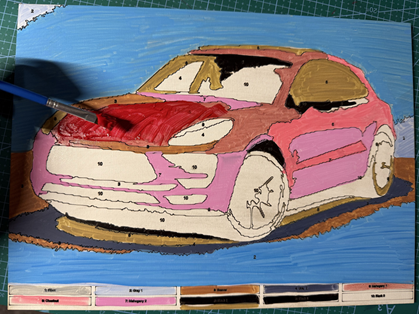
Paint by number flips a photo into a craft kit: the image is reduced to a palette of flat colors, every region gets an outline and a number, and a legend maps numbers to paint colors. This tool does the whole conversion in your browser (the photo is never uploaded anywhere) and exports clean vector outlines instead of the fuzzy raster traces most converters produce.
Engrave the outlines on a plywood panel for a heirloom paint kit, or print them on canvas paper for a classic boxed-kit experience. Pet portraits, houses, and vacation shots make the best subjects.
What You'll Need
- Laser engraving: laser cutter, 3 mm laser-grade plywood or a primed wood panel, acrylic craft paints and brushes
- Printing: any inkjet or laser printer, canvas paper or heavy matte stock, acrylic paints
Step 1 - Upload a photo
Open the tool and upload your image. High-contrast photos with a clear subject convert best; busy backgrounds become hundreds of fiddly regions. Processing happens locally in your browser.
Step 2 - Tune the regions
- Number of Colors (3 to 20) sets the palette. Eight to twelve is the sweet spot: enough depth to read as the photo, few enough paints to actually mix.
- Min Region Size merges specks into paintable areas; raise it until the smallest regions look brush-sized at your output dimensions.
- Output Width sets the physical size with the Units toggle; bigger panels tolerate more colors and detail.
Step 3 - Export
Download the SVG. It contains the region outlines, the number in every region, and the numbered color legend so you know exactly what to mix.
Choose Your Build Method
Engraving the kit
- Import the SVG and set outlines and numbers to a light vector score; they should guide the brush, not trench the wood.
- Engrave onto sanded plywood, or prime the panel white first for truer paint colors.
- Score the legend along the panel's edge or on a separate offcut to keep the art clean.
- Match acrylic paints to the legend swatches and decant into numbered cups.
- Paint regions largest to smallest; scored borders stop bleed and stay charmingly visible, like the linework in a vintage kit.
Make It Yours
- Pet portrait kit, the undisputed champion of paint-by-number gifts.
- First-home portrait: engrave the new house on a panel for a housewarming.
- Date-night kit: the same photo on two panels, one per painter.
- Kids' version: 5 to 6 colors and a high Min Region Size for chunky, fun regions.
- Wedding-photo kit as a first-anniversary (paper) or fifth (wood) gift.
- Paint the panel yourself and gift it finished, with the scored numbers as texture.
- Grandparent gift: a grandkid photo kit with paints labelled in big print.
- Craft-night batch: one vacation photo, six printed copies, friends compare results.
New free tools, every month.
New laser cutting tools, what's coming next, and features we're building right now. Only MyLaserTools.com news. No spam, ever.
© 2026 MyLaserTools.com. All rights reserved.