

Making a luggage tag with the Leatherette Luggage Tag Map preset
Difficulty: Beginner · Time: 15–25 minutes per tag · Methods, ranked: 1) Laser engrave + cut on leatherette (the intended build), 2) the same file on anodized aluminum or 3 mm wood for a rigid tag, 3) engrave on a pre-made leatherette tag blank if you'd rather skip the cutting.
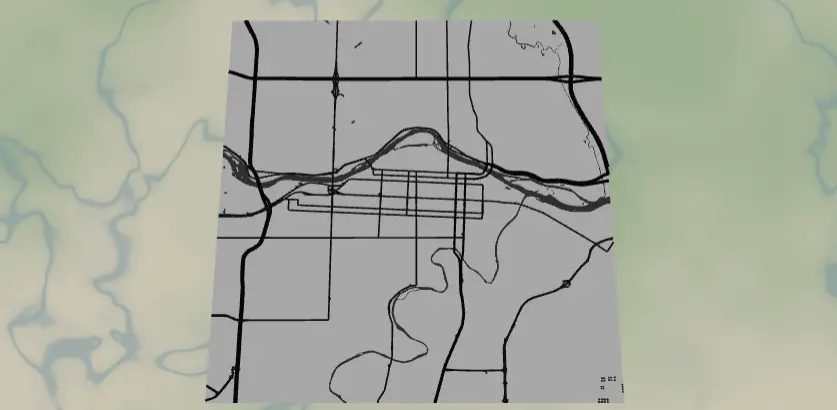
A bold, minimal street map of home engraved on a leatherette luggage tag - so the bag on the carousel is unmistakably yours, and the map says where it's headed back to. The preset ships set up on Calgary with only the major road skeleton and the river: deliberately stripped down, because a tag is small and lives a hard life. The export modal's Hanger hole option adds the reinforced strap hole.
What You'll Need
Laser on leatherette (recommended)
- Laserable two-tone leatherette sheet (PU, laser-safe - never PVC); black/silver or brown/gold are classics for luggage
- Laser cutter (diode or CO2)
- A strap: leather lace, a small buckle strap, a snap clip, or a stainless cable loop through the hanger hole
- Optional: a second blank piece to glue back-to-back for a double-sided, stiffer tag (with a name/phone engraved on side two)
Step 1 - Start from the preset
Open the Leatherette Luggage Tag Map preset. It loads on Calgary at zoom 12.2 - a wide city-scale view where only the big roads and the Bow River register. Search for your home city.
Framing tips:
- Stay zoomed out (12–12.8). This preset intentionally shows just motorways, primary, and secondary roads - at tag size (~60–90 mm) that skeleton is what stays legible. Zooming in defeats the minimalism.
- A river or ring road gives the tag its identity at a glance - frame so it sweeps across the tag.
- The preset frame is square; classic luggage tags are ~2:1 landscape. Either keep the square (it looks modern) or switch the export aspect ratio to a wider one and re-frame.
Step 2 - Tune the layers
One layer group, Tag engraving (Solid mode), kept ruthlessly simple:
- Land - white (
#FFFFFF): untouched leatherette. - Water - grey (
#4A4A4A): the river engraves as the tag's boldest shape. - Roads - motorway (width 6,
#111111), primary (4,#111111), secondary (3,#1F1F1F). The widths are chunky on purpose: at 70 mm wide, a width-6 motorway is still only a couple of millimetres of engraved line. Don't add tertiary or neighborhood streets - they turn to fuzz at this size.
If your city has no major water in frame, the road skeleton alone can look sparse; either add the parks feature for one mid-grey shape, or zoom out a touch to pull in the orbital roads.
Step 3 - Export
In the export modal:
- Enable the Hanger hole - the essential option here. It adds a ring with a real hole that merges into the tag outline; position it top-center (or a top corner for a landscape tag) and size the hole 4–6 mm so a strap or cable loop threads through with room to swivel. The ring border doubles as reinforcement around the hole.
- Download the per-layer SVG: map engraves, outer rectangle + hanger hole cut.
- Small-polygon cleanup on.
- Background toggle is irrelevant for the SVG route; if you grab a PNG preview for a listing photo, leave background on.
Choose Your Build Method
Laser engrave + cut on leatherette
- Size the file: 70–90 mm on the long side is standard luggage-tag territory.
- Hold the leatherette flat on the bed (magnets or tape - it curls).
- Engrave pass first: low power, high speed; test on scrap to get a clean contrast without scorching the edges of the wide motorway lines.
- Cut pass: perimeter and hanger hole, one light pass.
- Optional double-sided build: engrave a second piece with name + phone (do that text in your laser software), then glue the two back-to-back with contact cement or 3M tape 300LSE and re-cut or edge-trim. Stiff, classy, and your contact info isn't facing the world.
- Thread the strap through the hanger hole, loop it through the suitcase handle, and pull snug.
Rigid tag in aluminum or wood
- Engrave the same SVG on laserable anodized aluminum (one fast pass strips to bright silver) or 3 mm hardwood ply.
- Cut the outline and hanger hole - on aluminum, use a pre-cut blank and just position the hanger hole over the blank's existing hole.
Make It Yours
- Engrave "If found →" and a phone number on the back side; keep the map face clean.
- His & hers set: same city, two crops - one centered on each person's old neighborhood.
- Airport-code style: big three-letter code (YYC) engraved in a bottom corner over a quiet patch of land.
- Coordinates strip along the bottom edge - latitude/longitude of home in small text.
- Switch to the wider export aspect ratio and add a buckle strap kit for the classic leather-tag silhouette.
- Family pack: four tags, four colors of two-tone leatherette, one city - everyone's bag is identifiable at the carousel.
- Pair it with the Leatherette Journal Cover and Leatherette Map Patch presets in the same city for a matched travel set.
New free tools, every month.
New laser cutting tools, what's coming next, and features we're building right now. Only MyLaserTools.com news. No spam, ever.
© 2026 MyLaserTools.com. All rights reserved.