

Making a circular lake map with the Lake Map preset
Difficulty: Easy. Time: about an hour of cutting plus glue-up. Best methods, in order: laser cutting, 3D printing, UV print.
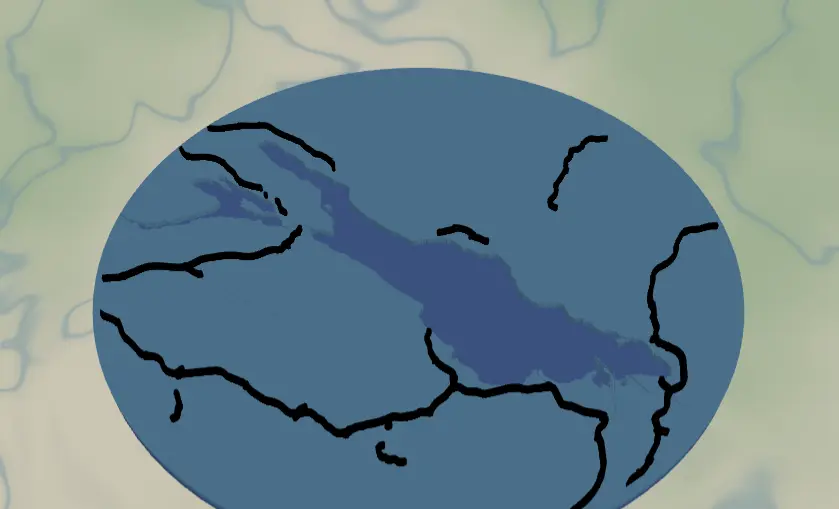
This preset makes the round lake keepsake you've seen at craft fairs: a circular plate where the lake is cut clean out of the land, blue showing through from below, with the surrounding road network laid on top. It ships framed on Lake Constance and works for any lake with a recognizable shoreline.
What You'll Need
Laser cutting
- 3 mm laser-grade plywood for the land plate and one sheet for roads
- 3 mm blue acrylic (or painted ply) for the backplate - this becomes the lake color
- Laser cutter, glue, weights, masking tape
3D printing
- FDM printer, PLA in blue + a land color + black, 3MF-capable slicer
UV print / sublimation
- High-res PNG, round blank (slate coaster, ceramic, hardboard circle)
Step 1 - Start from the preset
Open the Lake Map preset. It loads on Lake Constance at zoom ~9 - that's a regional view, wide enough to fit an entire large lake plus the towns around it. Search your lake and adjust: zoom 9–10 for big lakes (Tahoe, Constance, Michigan bays), 11–12 for small cottage lakes. The circle crop uses 90% of the frame, so keep the whole shoreline comfortably inside the circle preview.
Step 2 - Tune the layers
Three layers, top to bottom:
- Roads - Solid mode, every class from motorways (width 5) down to streets, raceways, and other roads (width 2), all black. At this regional zoom the road net is sparse and graphic. If the area around your lake looks cluttered, toggle off
roadsOtherandroadsStreetfirst; if it's empty wilderness, that's fine - the lake is the hero. - Water - Solid mode with invert as holes: the land plate, with the lake (fill
#4EA8DEin preview) subtracted. This is the piece that defines the project. - Backplate -
#2d70cdblue. Whatever material you use here is your lake, so pick something nice: blue acrylic, resin-filled, or hand-painted.
A 10-unit global border insets everything from the circle edge so roads don't run off the rim.
Step 3 - Export
- Laser: per-layer SVG ZIP, water inversion left on, small-polygon cleanup on (regional zoom produces tiny island and pond slivers). Add the Hanger hole ring mounting option if it's going on a ribbon.
- 3D printing: 3MF (multicolor) or STL.
- UV print: high-res PNG; with Background off you get a transparent PNG so a slate or wood blank shows as the land.
Choose Your Build Method
Laser cutting
- Cut the Backplate circle from blue acrylic.
- Cut the Water layer - the circular land plate with the lake-shaped hole. Keep islands! They'll be loose pieces; tape the sheet so you don't lose them, and glue them back in position over the backplate.
- Cut the Roads layer - or, better at this zoom, engrave the roads onto the land plate. Solid-mode road ribbons at regional scale are long and thin; engraving avoids handling spaghetti.
- Glue backplate → land plate (+ islands) → roads. Weight it flat. 3M tape works too: 467 or 468 for the acrylic backplate, 300LSE for harder materials, with no squeeze-out to clean.
- Sand the circle edge flush and finish.
Make It Yours
- Any lake with personality works: Tahoe, Como, Garda, Lake of the Ozarks' dragon sprawl, your family's cottage lake.
- Pour tinted epoxy into the lake hole instead of relying on the backplate color - instant glassy water.
- Palette swap: land in walnut, lake
#0E4C66deep navy, roads off; minimalist and classy. - Shrink to 90 mm, add the Hanger hole ring, and you have a lake-house ornament.
- Add a heart icon on the family dock location before exporting.
- Switch
exportShapeto hexagon or rect if circles aren't your thing - the layers adapt. - Make a set: the same lake at zoom 9, 11, and 13 as a triptych zooming into the cabin.
New free tools, every month.
New laser cutting tools, what's coming next, and features we're building right now. Only MyLaserTools.com news. No spam, ever.
© 2026 MyLaserTools.com. All rights reserved.