

Making an earring display stand with the Earring Holder Generator
Difficulty: easy to medium. Time: 15 minutes design, 20-40 minutes making. Best methods: laser-cut plywood or acrylic, 3D printed panel and stand.
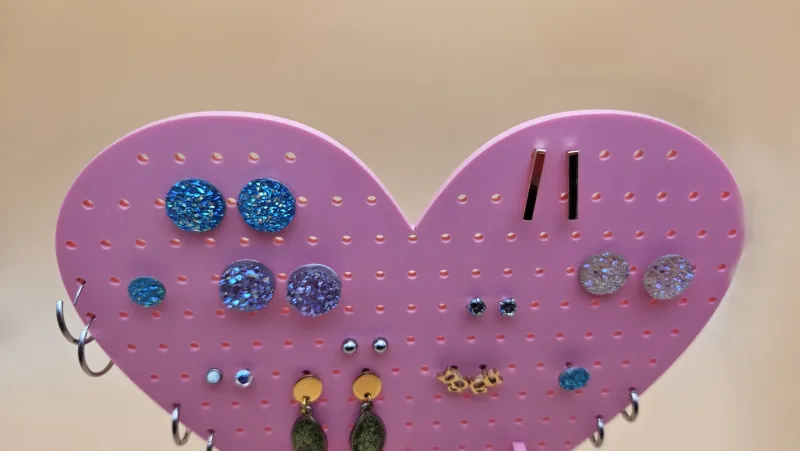
This tool builds the whole display, not just a pretty panel. Pick a Shape - Arch, Full Arch, Left or Right Arch, Gothic, Heart, Oval, Octagon, Rectangle, or Scalloped - then lay out a grid of Holes with Rows, Columns, and margins for stud earrings, plus optional Slots for hook-style pairs. The stand section generates a slotted foot sized to your Material Thickness, and a built-in 3D assembly preview shows the finished stand before you cut anything.
What You'll Need
- Laser cutting: 3 mm laser-grade plywood for a warm boutique look, or acrylic for a glossy retail one
- 3D printing: an FDM printer with a bed large enough for the panel, or print it in halves
- Finishing: sandpaper for plywood edges; no glue needed - the stand slots together
Step 1 - Shape the panel
Pick a shape and set Width and Height - 120 x 160 mm holds a personal collection, 200+ mm suits market displays. Corner Radius softens rectangular panels. Set Material Thickness to your actual sheet thickness first; the stand slots depend on it.
Step 2 - Holes, slots, and stand
- In Holes, set Rows, Columns, and Hole Size (1.5-2 mm for studs), then frame the grid with the Top/Bottom/Side Margin controls.
- Add Slot Rows with Slot Height and Slot Padding if you sell hook earrings - hooks hang through slots much faster than through holes.
- In Stand, set Stand Height and Stand Length for the lean angle, and Tab Width for the joint. Check the 3D assembly preview to confirm the stance looks stable.
Step 3 - Export
Download the SVG to cut panel and stand from one sheet, or STL/3MF to print both parts. The slot joint is sized from your material thickness, so double-check that number before exporting.
Choose Your Build Method
Laser cutting
- Cut panel and stand together; the small stud holes like a slightly slower speed so they release cleanly.
- Test the slot fit on a scrap first - if it is loose, reduce Material Thickness by 0.1 mm and re-export; laser kerf varies by machine.
- Sand plywood faces before assembly, slide the stand into the panel slot, and it is done.
- For acrylic, peel masking after cutting and flame-polish only the outer edges, not the joint.
Make It Yours
- Cut the panel from frosted acrylic so light passes through your earring display at markets.
- Engrave your shop name across the top margin before cutting.
- Make a mini gothic-arch holder as a gift to bundle with a pair of earrings from the Earrings Generator.
- Use the heart shape in pink acrylic for a Valentine retail display.
- Mix holes and slots on one panel: studs up top, hooks below.
- Stain plywood panels dark and leave the laser-cut edges raw for contrast.
- Scale the rectangle shape wide and short for a necklace bar instead.
New free tools, every month.
New laser cutting tools, what's coming next, and features we're building right now. Only MyLaserTools.com news. No spam, ever.
© 2026 MyLaserTools.com. All rights reserved.