

Making a blueprint panel with the Blueprint Map preset
Difficulty: easy. Time: 30–45 minutes printed. Best methods, in order: UV printing, sublimation on white metal panels, laser engraving on coated materials. 3D printing works but the width-1/1.5 linework is at the edge of what FDM resolves - notes below.
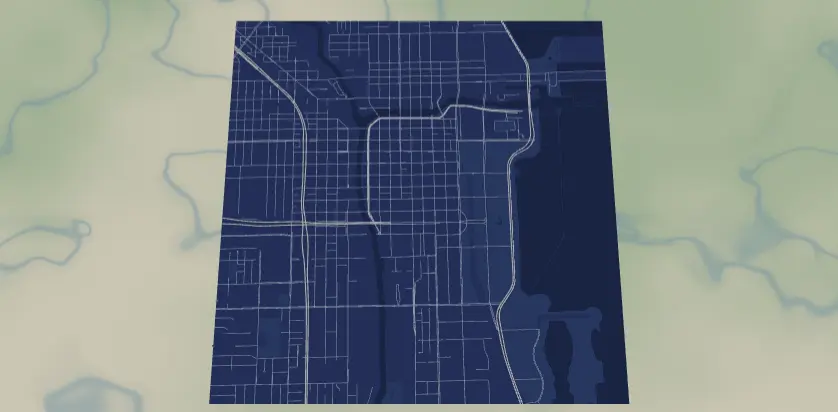
This preset redraws a city as an architect's blueprint: fine white linework on deep blueprint blue, with water and parks as barely-darker and barely-lighter shades of the same blue. It's built for UV printing on acrylic and metal, where the fine width-1 streets stay razor sharp. The result looks like a drafting-room artifact - perfect for engineers, architects, new-home gifts, and offices.
What You'll Need
- UV printing: flatbed UV printer, white or clear acrylic, brushed or white aluminum composite panel; blue acrylic if you want to print lines-only
- Sublimation: sublimation printer + paper, white gloss poly-coated aluminum panel (gloss metal sells the blueprint look), heat press, heat tape, butcher paper
- Laser engraving: laser plus blue- or black-anodized aluminum, or blue-over-white two-tone acrylic - reveal materials reproduce white-on-blue directly
- 3D printing: multi-color printer, deep blue + white filament; plan to thicken the lines first
Step 1 - Start from the preset
Open the Blueprint Map preset. It loads Chicago at zoom 13.2 - the scale where the full street hierarchy shows and the grid reads as drafting linework. The aesthetic rewards gridded cities: Chicago, Barcelona, Portland, Toronto. Search your city and frame so a strong axis (lakefront, river, main boulevard) runs through the square; blueprint compositions like a straight datum line. Stay near zoom 13–13.5 - this preset needs the width-1 street mesh to fill space, so don't zoom out past ~12.7 or the fine grid muddies.
Step 2 - Tune the layers
One Solid layer group, Blueprint:
land-#0B3D91the blueprint blue.water-#0A2F70a step darker; Lake Michigan reads as a deep field.landusePark-#10489Fa step lighter, ghosting in the green spaces without breaking monochrome.- Linework:
roadsMotorway#FFFFFFwidth 2,roadsPrimary#FFFFFFwidth 1.5,roadsSecondary#DCE7F7width 1,roadsStreet#C3D4EFwidth 1.
The whole point is fine, even linework - resist the urge to thicken for print methods that hold detail (UV). For sublimation, where ink gas spreads, the width-1 #C3D4EF streets will soften and slightly blur into the blue; bump them to width 1.5 and #DCE7F7 if your presses run hot. Note water vs land is a subtle 1-step difference by design - if your composition depends on the water (coastal cities), deepen water to #082757 so it survives every method.
Step 3 - Export
- UV / sublimation: 4096 px PNG, background ON for white substrates. On blue acrylic or blue-coated metal, toggle Background off (and hide
water/landusePark) for a transparent PNG of pure linework - the substrate becomes the blueprint. - Laser: per-layer SVG ZIP, lines only (Background off).
- 3D: 3MF, after thickening lines (below).
- Corner holes are the natural Mounting holes choice - standoff-mounted on acrylic with anodized standoff spacers, it reads exactly like a framed drawing set. The compass icon overlay suits the drafting theme if you have an empty corner of lake or park.
Choose Your Build Method
UV printing
- Export the PNG - full art for white substrates, transparent lines-only for blue ones.
- In the RIP, size to panel. The fine linework is why UV ranks first: width-1 streets at 4096 px stay crisp even at 400+ mm panels.
- On clear acrylic: white underbase, then color - backlit, it glows like a light table.
- Register, print, optional matte varnish (blueprints are matte artifacts).
Sublimation
- Print mirrored at final size; consider the width/color bump for streets from Step 2.
- Tape face-down to a white gloss aluminum panel.
- Press with the settings recommended for your material, paper, and inks, with butcher paper protection.
- Peel hot. The deep
#0B3D91floods rich on gloss metal; whites are no-ink zones revealing the panel. A slight softening of the finest streets is normal - it reads as aged diazo print, which suits the theme.
Make It Yours
- Grid cities are king: Barcelona's Eixample, Manhattan, Portland's tiny blocks, Savannah, Kyoto's ancient grid.
- Inverse blueprint: land
#F2F5FA, all lines#0B3D91- blue-on-white drafting paper, and the variant that raster-engraves perfectly on raw wood. - Blackprint: land
#101010, lines#E8E8E8for a modern architectural dark mode. - Sepia survey: land
#3B2F23, lines#E8D9B8- Victorian engineering drawing. - Print on clear acrylic and mount over an LED panel for a working "light table" piece.
- Add a route layer in drafting red
#D7263Dmarking the route to a new house - perfect closing gift from a realtor. - Heart export shape over the city where you bought your first home, same palette.
- Pair with the Figure Ground preset of the same district - plan and massing, side by side like a real drawing set.
New free tools, every month.
New laser cutting tools, what's coming next, and features we're building right now. Only MyLaserTools.com news. No spam, ever.
© 2026 MyLaserTools.com. All rights reserved.