

Making name tags with the Backpack Tag Generator
Difficulty: easy. Time: 10 minutes to design, under an hour to print. Methods: 3D printing or laser cutting.
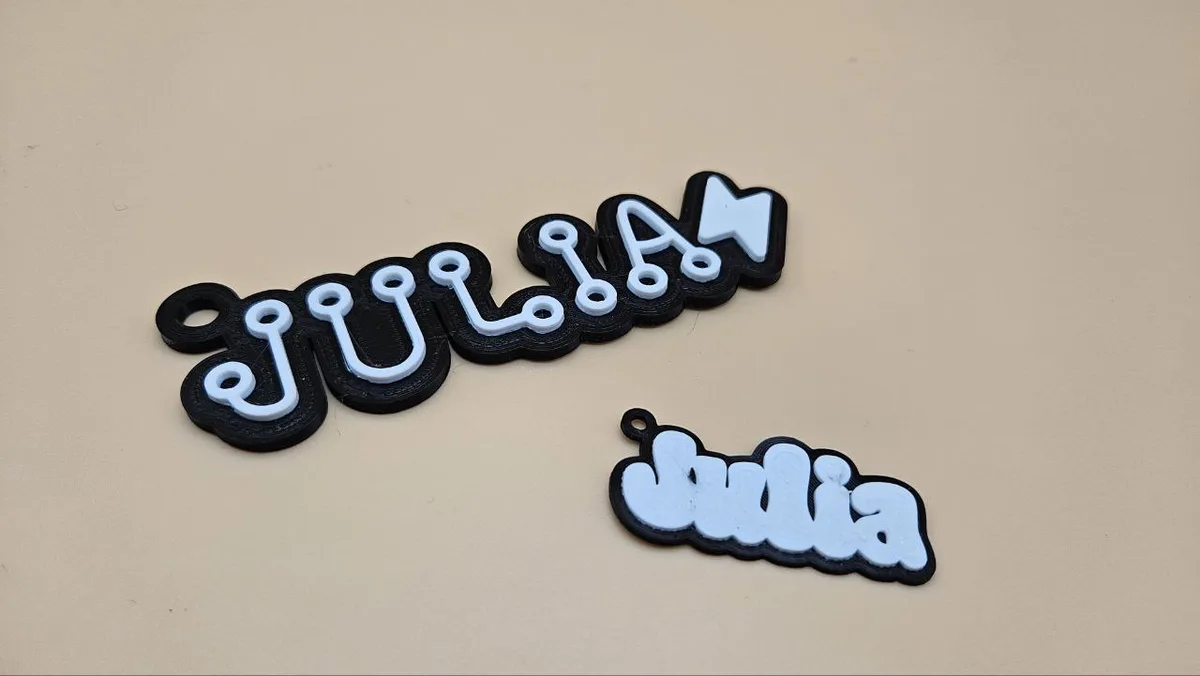
A backpack tag is the perfect personalization project: small, fast, instantly recognized as theirs by the kid (or gym-bag owner) it belongs to. This tool builds the whole tag from the text itself: the name becomes the body, wrapped in a smooth outline with a reinforced hanging ring, so the tag's shape is the name.
It is genuinely dual-format. The 3MF export carries base and text as separate colors for multi-material printers, and the SVG export gives you the same outline-plus-text design as layers for laser cutting in contrasting materials.
What You'll Need
- 3D printing: any FDM printer; two filament colors make the name pop
- Laser: scraps of laser-grade plywood or acrylic in two colors
- Keychain snap clips or split rings to attach the tag to the zipper
Step 1 - Type the name
Open the tool, set your Units, and type Your Text. Pick a Font; rounded, chunky fonts survive playground life best. Toggle Connect Text to merge script letters into one continuous shape, which is what keeps a cursive tag from falling into pieces.
Step 2 - Symbol, shape, and colors
- Add a Symbol (heart, star, dino, and more) before, after, or on both sides of the name, then tune Symbol Size and the X and Y offsets to nest it into the lettering.
- Tag Width sets the finished size; 70-90 mm reads clearly on a backpack. Outline Size controls the border wrapped around the text, and Thickness the overall depth.
- The hanging ring has its own Hole Offset, Hole Size, and Inner Hole Size controls; make sure the inner hole clears your snap clip or split ring.
- For printing, set Background Colour and Text Colour plus Base Depth and Text Raise, which is how far the letters stand proud of the base.
Step 3 - Export
Download 3MF (preferred, carries both colors) or STL for printing, or SVG for the laser.
Choose Your Build Method
Print a two-color tag
- Open the 3MF in your slicer; base and raised text import as separate parts. Assign each its filament on a multi-material machine.
- Single-color printer? Pause at the layer where the text starts (Base Depth height) and swap filament for a perfect two-tone tag.
- Print flat at 0.2 mm layers, no supports; a tag takes 20-40 minutes.
- PETG handles being slammed in lockers better than PLA.
- Clip it on with a snap clip through the ring; print a spare, because favorite tags travel.
Make It Yours
- First-day-of-school batch: one tag per kid in their favorite color with a symbol that matches their obsession.
- Team sports set: every player's name with a ball symbol in club colors.
- Luggage version: bump the tag width up and use a high-contrast color pair you can spot on a carousel.
- Dog leash tag with a bone or paw symbol on both sides of the name.
- Glow-in-the-dark text filament makes a tag findable in a dark tent at camp.
- Match a tag to the 3D Print Box Generator lunchbox label for a coordinated school set.
- Teacher gifts: a tag per student on a classroom job board.
New free tools, every month.
New laser cutting tools, what's coming next, and features we're building right now. Only MyLaserTools.com news. No spam, ever.
© 2026 MyLaserTools.com. All rights reserved.